WhatsApp beta for Android 2.25.20.3: what's new?
WhatsApp has released a new Android update through the Google Play Beta Program, bringing the version up to 2.25.20.3.
What's new in this update? WhatsApp is rolling out a feature to create status updates from the share sheet, and it's available to some beta testers!
| Common questions | Answers |
|---|---|
| Name of the feature? | Share status update |
| Status? | Rolling out |
| Compatibility? | WhatsApp beta for Android 2.25.20.3 has been designated as a compatible update, but some users may get this feature by installing certain previous updates. |
| I've installed this update but I don't have this feature. Why? | This feature is available to some beta testers, and it is rolling out to more users over the coming weeks. |
| Thanks: | Sc, flakoflow, FastenM, kingcyrious, and shw_9876, for testing and reporting. |
| Previous news? | WhatsApp beta for iOS 25.19.10.74: what's new? WhatsApp is working on a feature that allows users to switch between multiple accounts! |
SHARE STATUS UPDATE
In the article about the WhatsApp beta for Android 2.25.18.9 update, we announced that an optional feature to allow resharing and forwarding status updates was available. This feature gives users more control over the visibility of their content by letting them choose whether others can reshare each individual status update. Previously, status updates could only be reshared if the user was mentioned privately, but this update expands the functionality by allowing resharing even without direct mentions. It also seems that WhatsApp now aims to make the status creation process even more intuitive through new entry points, enhancing how users can share content with the app. Following the release of the latest WhatsApp beta for Android 2.25.20.3 update, which is available on the Google Play Store, we discovered that WhatsApp is rolling out a feature to create status updates from the share sheet!
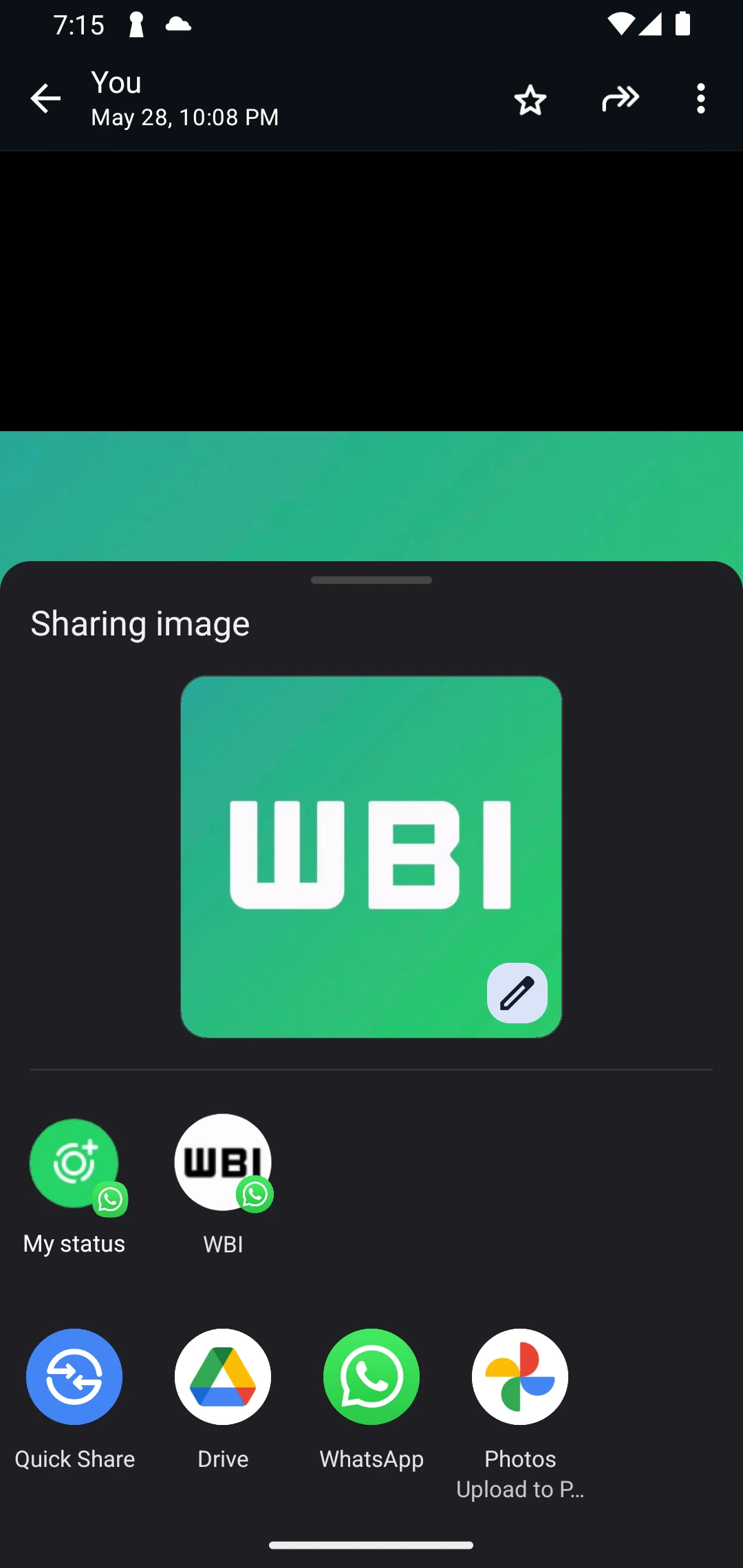
As you can see from the attached screenshot, some beta testers can explore a new feature that allows them to share media directly as a status update through the Android share sheet. This new entry point appears whenever a user wants to share a photo or video, either from another app or directly from within WhatsApp. For example, if the user is browsing their gallery or viewing content in a third-party app and tap the share icon, they will now see the "My Status" option alongside other sharing destinations. By selecting this option, the media is immediately routed to the status update editor, where users can add text, emojis, drawings, or captions before publishing.
This feature aims to significantly streamline the process of creating status updates. Previously, users had to manually save media from other apps, then open WhatsApp, navigate to the Updates tab, and upload the content from there. This could be time-consuming and inconvenient, especially in cases where the media wasn't already saved to the device. Now, with this shortcut in the share sheet, users can bypass those extra steps entirely.
The ability to create status updates directly from the Android share sheet is especially useful when handling temporary or ephemeral content, such as screenshots, spontaneous photos, or quick video clips, which users often prefer not to save permanently on their devices. Instead of going through the extra steps of saving the file and opening WhatsApp manually, users can now instantly share this type of content as a status update with just a few taps, making the process significantly faster and more efficient. This streamlined approach is ideal for casual sharing, where speed and convenience are more important than archiving the content.
A feature to create status updates from the share sheet is available to some beta testers who install the latest updates of WhatsApp beta for Android from the Google Play Store, and it is rolling out to even more people over the coming weeks.
Stay up-to-date on WhatsApp news by following WABetaInfo on X. You can also discover other new features for WhatsApp beta for Android, iOS, Web/Desktop, and Windows.
Do you like this news? Please, let us know on X: we love hearing your feedback! If you're curious to see where you can find WABetaInfo, there is a dedicated page where you can discover our services.
In addition, we have set up a Discord Server where you can chat with other people, get help and advice, and stay up to date with the latest announcements from WABetaInfo.