WhatsApp beta for Android 2.25.17.27: what's new?
WhatsApp has released a new Android update through the Google Play Beta Program, bringing the version up to 2.25.17.27.
What's new in this update? WhatsApp is working on a feature to manage message notifications for chat lists, and it will be available in a future update!
| Common questions | Answers |
|---|---|
| Name of the feature? | Message notifications for chat lists |
| Status? | Under development |
| Availability? | WhatsApp is currently developing a feature to manage message notifications for chat lists, which is expected to be released in a future update. |
| I've installed the update, but this feature isn't available. Why? | This feature is currently in development and not yet available for beta testing. In the meantime, you can read this article for a sneak peek. |
| Previous news? | WhatsApp beta for Android 2.25.17.24: what's new? WhatsApp is working on an optional feature to filter AI-powered chatbots! |
MESSAGE NOTIFICATIONS FOR CHAT LISTS
In the article about the WhatsApp beta for Android 2.24.4.12 update, we announced that a feature to keep chat list filters permanently visible was available. This feature ensures that filters are now pinned at the top of the chat list, as users had to previously scroll down to reveal these filters. This makes chat lists instantly accessible upon launching the app, allowing users to quickly navigate between their different chat categories. It also seems that WhatsApp aims to further enhance the convenience of these filters by introducing more bulk actions to manage chats more efficiently. Following the release of the latest WhatsApp beta for Android 2.25.17.27 update, which is available on the Google Play Store, we discovered that WhatsApp is working on a feature to manage message notifications for chat lists!
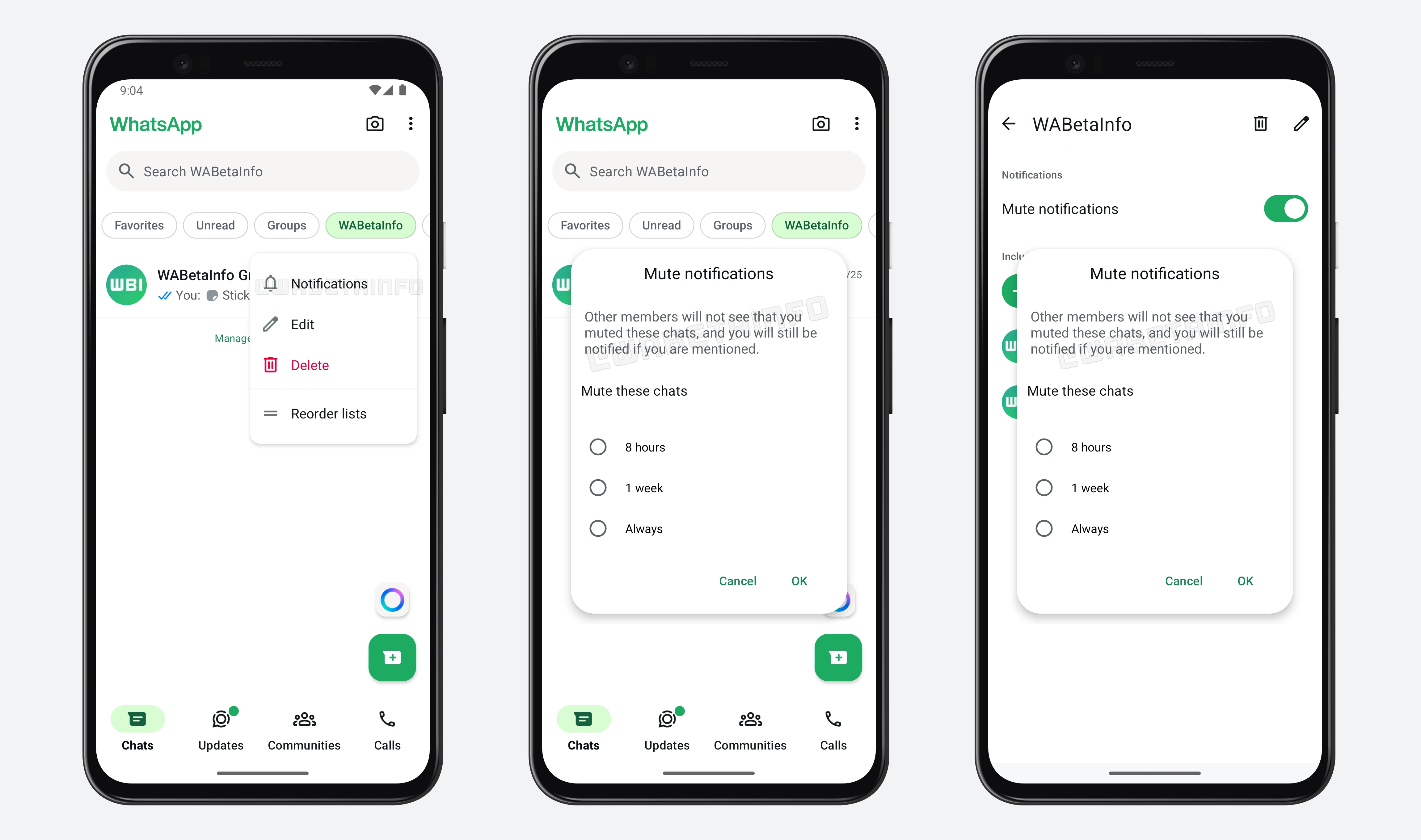
As you can see from the attached screenshot, WhatsApp is exploring the implementation of a feature that will allow users to mute notifications for all chats included in a specific list, scheduled fore release in a future update. By tapping and holding on a chat list, a new context menu will appear, offering additional options, including a notification management feature. Through this feature, users will be able to mute all conversations that belong to the selected list with a single action. The same option will also be available within the list settings, providing users with more control over how and when they receive notifications from different types of chats.
Currently, users need to select each chat individually to mute it, which can be time-consuming and inconvenient, especially for those who manage a large number of conversations. The new functionality aims to streamline this experience by enabling users to mute all chats within a specific list or category in just one step. By eliminating the need for repetitive manual actions, this feature significantly enhances user control, making it easier and faster to manage notifications and maintain focus without unnecessary distractions.
This feature will be particularly useful in scenarios where users want to temporarily disconnect from a specific group of people. For example, if someone has created a list that includes all their work colleagues, it might be helpful to mute these chats during weekends or holidays when they don't want to be disturbed by work-related messages. Similarly, students might group all their classmates under one filter and mute that list during vacation periods or outside study hours. This level of customization is ideal for professionals, students, or anyone who wants to manage their conversations more intentionally, as this bulk notification feature enhance overall chat organization.
A feature to manage message notifications for chat lists is under development and it will be available in a future update. We will keep you updated with an additional article as soon as we have more details to share about this feature.
Stay up-to-date on WhatsApp news by following WABetaInfo on X. You can also discover other new features for WhatsApp beta for Android, iOS, Web/Desktop, and Windows.
Do you like this news? Please, let us know on X: we love hearing your feedback! If you're curious to see where you can find WABetaInfo, there is a dedicated page where you can discover our services.
In addition, we have set up a Discord Server where you can chat with other people, get help and advice, and stay up to date with the latest announcements from WABetaInfo.