WhatsApp beta for Android 2.25.14.12: what's new?
WhatsApp has released a new Android update through the Google Play Beta Program, bringing the version up to 2.25.14.12.
What's new in this update? WhatsApp is rolling out a feature to create group chats without needing to add members right away, and it's available to some beta testers!
| Common questions | Answers |
|---|---|
| Name of the feature? | Empty group chat creation |
| Status? | Rolling out |
| Compatibility? | WhatsApp beta for Android 2.25.14.12 has been designated as a compatible update. |
| I've installed this update but I don't have this feature. Why? | This feature is available to some beta testers, and it is rolling out to more users over the coming weeks. |
| Previous news? | WhatsApp beta for iOS 25.13.10.71: what's new? WhatsApp is rolling out a feature to improve accessibility to status creation tools! |
EMPTY GROUP CHAT CREATION
In the article about the WhatsApp beta for Android 2.25.5.8 update, we announced that a redesigned call menu for chats and groups was available. This new interface replaces the previous separate voice and video call buttons with a unified call button that opens a menu, giving users the choice to initiate either a voice or video call and offering additional tools, such as the ability to create call links and select specific participants in group calls. The new menu significantly minimizes the chances of users starting a call by mistake, as it requires them to first select their preferred call option from a menu rather than initiating a call immediately with a single tap. It appears that WhatsApp is now releasing additional tools for group chats, aiming to improve overall user convenience. Following the release of the latest WhatsApp beta for Android 2.25.14.12 update, which is available on the Google Play Store, we discovered that WhatsApp is rolling out a feature to create group chats without needing to add members right away!
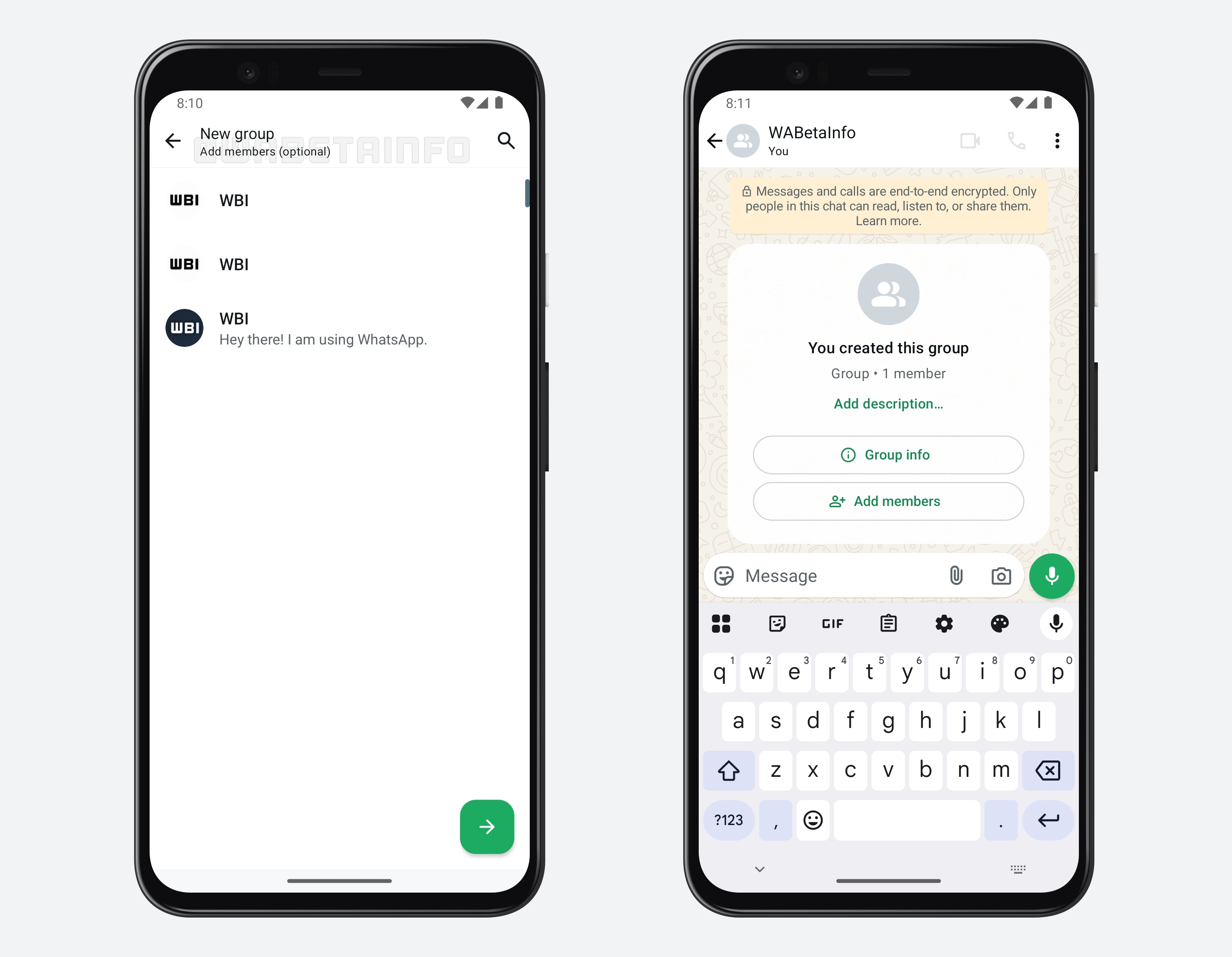
As you can see from the attached screenshot, some beta testers can explore a new way of creating groups without having to add participants immediately. To set up an empty group, users simply need to tap the floating action button in the Chats tab and then select the option to create a new group. If this feature is available, the top app bar will display a message indicating that adding participants is now optional.
This new option finally gives users greater flexibility when setting up a group, as they can now take their time to decide who they want to invite in the group. Instead of rushing to add participants during the creation process, users can reflect on who truly needs to be part of the conversation. This is especially helpful for planning-focused groups, where the member list may not be immediately clear since the creator might still be organizing ideas or determining the group's purpose.
It's worth noting that many users already take advantage of group chats where they are the only member. These private groups serve as a personal space to save important content, such as links, documents, or media files. These personal groups often act as a backup resource or a way to keep reminders, notes, and ideas organized. Some users even use them to draft messages or plan content before sending it elsewhere. With the ability to start a group without adding anyone, this use becomes even more accessible, as users no longer need to involve others just to set up the group and have them leave afterward.
A feature to create group chats without needing to add members right away is available to some beta testers who install the latest updates of WhatsApp beta for Android from the Google Play Store, and it is rolling out to even more people over the coming weeks.
Stay up-to-date on WhatsApp news by following WABetaInfo on X. You can also discover other new features for WhatsApp beta for Android, iOS, Web/Desktop, and Windows.
Do you like this news? Please, let us know on X: we love hearing your feedback! If you're curious to see where you can find WABetaInfo, there is a dedicated page where you can discover our services.
In addition, we have set up a Discord Server where you can chat with other people, get help and advice, and stay up to date with the latest announcements from WABetaInfo.