WhatsApp beta for Android 2.25.14.10: what's new?
WhatsApp has released a new Android update through the Google Play Beta Program, bringing the version up to 2.25.14.10.
What's new in this update? WhatsApp is rolling out a feature to open certain business website links, and it's available to some beta testers!
| Common questions | Answers |
|---|---|
| Name of the feature? | Business website links |
| Status? | Rolling out |
| Compatibility? | WhatsApp beta for Android 2.25.14.10 has been designated as a compatible update. |
| I've installed this update but I don't have this feature. Why? | This feature is available to some beta testers, and it is rolling out to more users over the coming weeks. |
| Previous news? | Meta enhances WhatsApp with new upcoming AI feature updates powered by Secure Private Processing! |
BUSINESS WEBSITE LINKS
In the article about the WhatsApp beta for Android 2.25.1.13 update, we announced that a feature to show the website icon for shared links was available. This feature displays the favicon next to the domain name in the message bubble when a link is shared with a rich preview. The favicon is a small and recognizable image associated with a website that provides users with a quicker visual cue to identify the source of the link. This enhancement improves the clarity and aesthetic of shared messages, making it easier for users to distinguish between different websites at a glance. It appears that WhatsApp is committed to enhancing the user experience with shared links in chats, aiming to improve overall convenience and usability. Following the release of the latest WhatsApp beta for Android 2.25.14.10 update, which is available on the Google Play Store, we discovered that WhatsApp is rolling out a feature to open certain business website links!
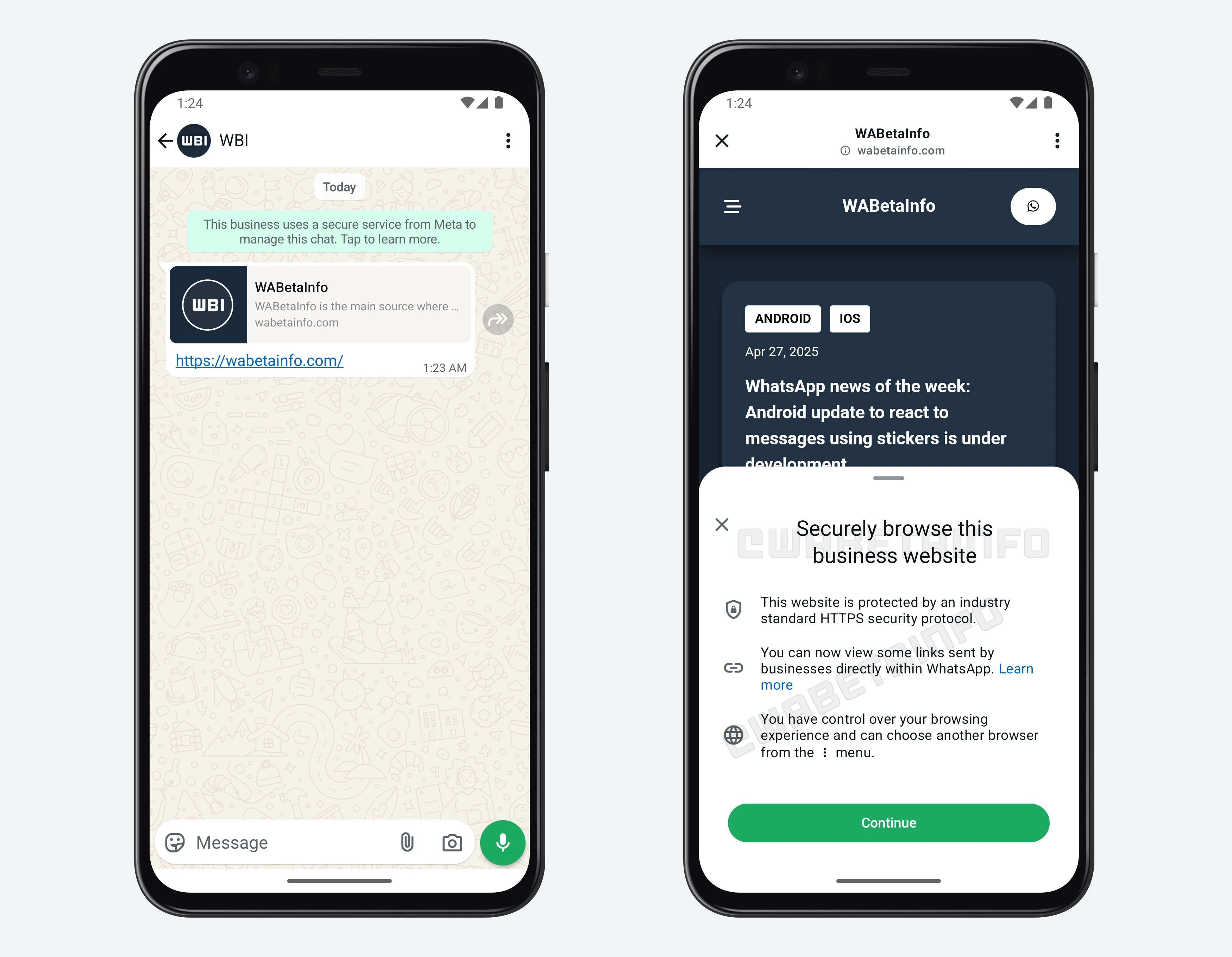
As you can see from the attached screenshot, some beta testers can explore a new in-app browser feature that allows specific links to open directly within the application. This means that when users tap on eligible links, WhatsApp won't automatically switch to the default external browser, such as Google Chrome or Samsung Internet. Instead, the linked content will be displayed seamlessly inside the app itself. Through this feature, WhatsApp aims to make the browsing experience faster, more fluid, and more intuitive, reducing the potential interruption that comes with switching between apps.
It is important to note that not all links are compatible with this new feature, but only those that belong to business websites and meet specific technical criteria are supported. For example, the site must follow the HTTPS protocol to ensure a secure connection, among other requirements set by WhatsApp. WhatsApp has also taken care to maintain user control. If users prefer not to use the in-app browser, they can still choose to open links with a different browser directly from the same screen. This flexibility ensures that users remain in charge of how they interact with shared content, as WhatsApp gives them the option to seamlessly switch to their preferred browser at any time without restricting their browsing experience or locking them into the in-app view.
Opening a website directly within WhatsApp allows users saves time, as there's no need to wait for an external browser to load. In addition, it keeps users within the app environment, which is especially helpful when businesses share their links to product catalogs, FAQs, or other customer support pages. Users can check the content and return to the conversation instantly, without missing context or losing the chat flow. It's also worth mentioning that the content of the chat remains private and it is never shared with the website being opened. WhatsApp ensures that the in-app browsing experience does not compromise the confidentiality of users' messages, as chats remain end-to-end encrypted and they are never accessible to the websites viewed within the app.
A feature to open certain business website links is available to some beta testers who install the latest updates of WhatsApp beta for Android from the Google Play Store, and it is rolling out to even more people over the coming weeks.
Stay up-to-date on WhatsApp news by following WABetaInfo on X. You can also discover other new features for WhatsApp beta for Android, iOS, Web/Desktop, and Windows.
Do you like this news? Please, let us know on X: we love hearing your feedback! If you're curious to see where you can find WABetaInfo, there is a dedicated page where you can discover our services.
In addition, we have set up a Discord Server where you can chat with other people, get help and advice, and stay up to date with the latest announcements from WABetaInfo.