WhatsApp beta for Android 2.25.1.11: what's new?
WhatsApp is rolling out a new update through the Google Play Beta Program, bringing the version up to 2.25.1.11.
What's new in this update? WhatsApp is rolling out a feature to simplify group chat and community creation, and it's available to some beta testers!
| Common questions | Answers |
|---|---|
| Name of the feature? | Group chat and community creation |
| Status? | Rolling out |
| Compatibility? | WhatsApp beta for Android 2.25.1.11 has been designated as a compatible update. |
| I've installed this update but I don't have this feature. Why? | This feature is available to some beta testers, and it is rolling out to more users over the coming weeks. |
| Thanks: | lostliano, for testing and reporting. |
| Previous news? | WhatsApp news of the week: feature to quickly contact support under development for the web client! |
GROUP CHAT AND COMMUNITY CREATION
In the article about the WhatsApp beta for Android 2.24.25.26 update, we announced that a feature to simplify group chat and community creation was under development. This feature is designed to centralize the creation tools within the Chats tab, providing users with a unified and streamlined interface for starting new chats, groups, and communities. It appears that WhatsApp is now testing this feature with the public, as some beta testers reported seeing new banners in the communities tab. Thanks to the latest WhatsApp beta for Android 2.25.1.11 update, which is available on the Google Play Store, we discovered that WhatsApp is rolling out a feature to simplify group chat and community creation!
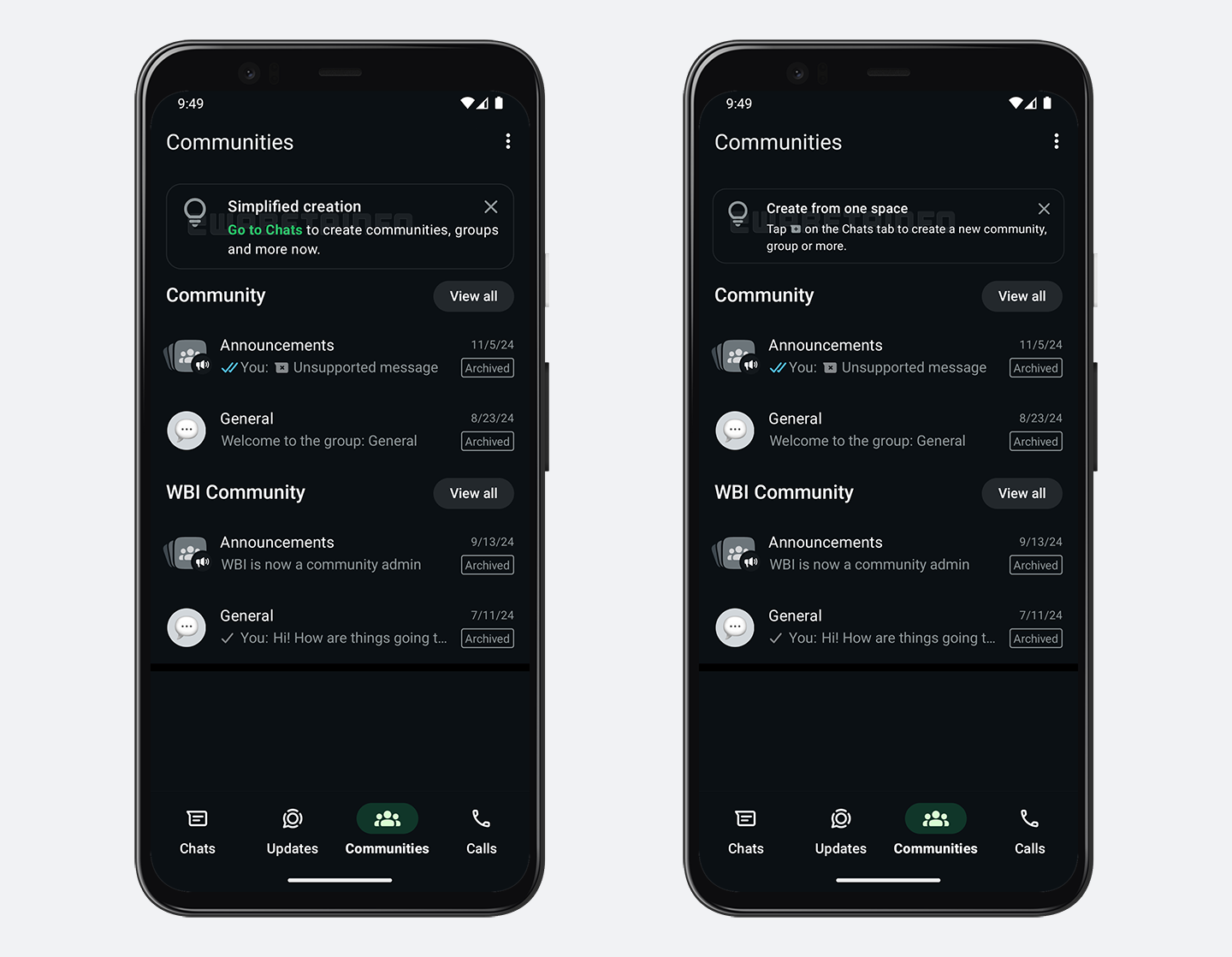
As you can see from the attached screenshot, some beta testers can explore a new feature that simplifies the process of creating communities, groups, and chats by centralizing all creation tools within the Chats tab. Users might see one of two banners guiding them to the new location for community creation options. These banners inform users that the ability to create communities has been moved to the Chats tab, which already hosts options for starting new chats and creating groups. By centralizing all creation tools in the Chats tab, WhatsApp aims to deliver a more unified and cohesive user experience, where all related options are grouped within a single interface. This change is expected to reduce confusion, as users won't have to navigate to different sections of the app for similar creation features.
Moving the community creation feature to the Chats tab also allows WhatsApp to remove the floating action button from the Communities tab. This aligns with their recent efforts to redesign the Communities tab, as highlighted in the article about the WhatsApp beta for Android 2.24.24.14 update, making it more visually appealing and less cluttered. With the floating action button removed, users will experience a cleaner and more focused interface when navigating their existing communities. Additionally, the banner emphasizes the simplicity of managing all chats, groups, and communities from one location. This update is likely designed to improve accessibility and the process for users, particularly those who frequently create multiple community group chats. The integration of creation tools into the Chats tab reduces the steps needed to create a new group or community, saving users time and effort.
The Communities tab, now free of the floating action button, can further focus on displaying existing communities more effectively. Users will find it easier to locate and interact with specific community groups without the distraction of additional elements of the interface. We believe that this redesign represents a good improvement in usability, especially for users creating numerous group chats and communities.
A feature to simplify group chat and community creation is available to some beta testers who install the latest updates of WhatsApp beta for Android from the Google Play Store, and it is rolling out to even more people over the coming weeks.
Stay up-to-date on WhatsApp news by following WABetaInfo on X. You can also discover other new features for WhatsApp beta for Android, iOS, Web/Desktop, and Windows.
Do you like this news? Please, let us know on X: we love hearing your feedback! If you're curious to see where you can find WABetaInfo, there is a dedicated page where you can discover our services.
In addition, we have set up a Discord Server where you can chat with other people, get help and advice, and stay up to date with the latest announcements from WABetaInfo.