WhatsApp beta for Android 2.24.25.3: what's new?
WhatsApp is rolling out a new update through the Google Play Beta Program, bringing the version up to 2.24.25.3.
What's new in this update? WhatsApp is rolling out a feature to add a message to any forwarded content, and it's available to some beta testers!
| Common questions | Answers |
|---|---|
| Name of the feature? | Add a message |
| Status? | Rolling out |
| Compatibility? | WhatsApp beta for Android 2.24.25.3 is marked as a compatible update, but some users might experiment with the same feature by installing certain previous updates. |
| I've installed this update but I don't have this feature. Why? | This feature is available to some beta testers, and it is rolling out to more users over the coming weeks. |
| Thanks: | Sc and Adwait Varma, for testing and reporting. |
| Previous news? | WhatsApp beta for iOS 24.24.10.72: what's new? WhatsApp is rolling out a feature to share sticker packs! |
ADD A MESSAGE
In the article about the WhatsApp beta for Android 2.23.10.3 update, we announced that WhatsApp was rolling out some improvements to add a message when forwarding media files. Specifically, the new update allows users to add a custom message while forwarding images, videos, and GIFs, even if the media does not have a caption. This enhancement eliminates the need to first remove an existing caption or separately send a context message after forwarding the media. It appears that WhatsApp continues to develop new features to add more context to forwarded messages. Thanks to the latest WhatsApp beta for Android 2.24.25.3 update, which is available on the Google Play Store, we discovered that WhatsApp is rolling out a feature to add a message to any forwarded content!
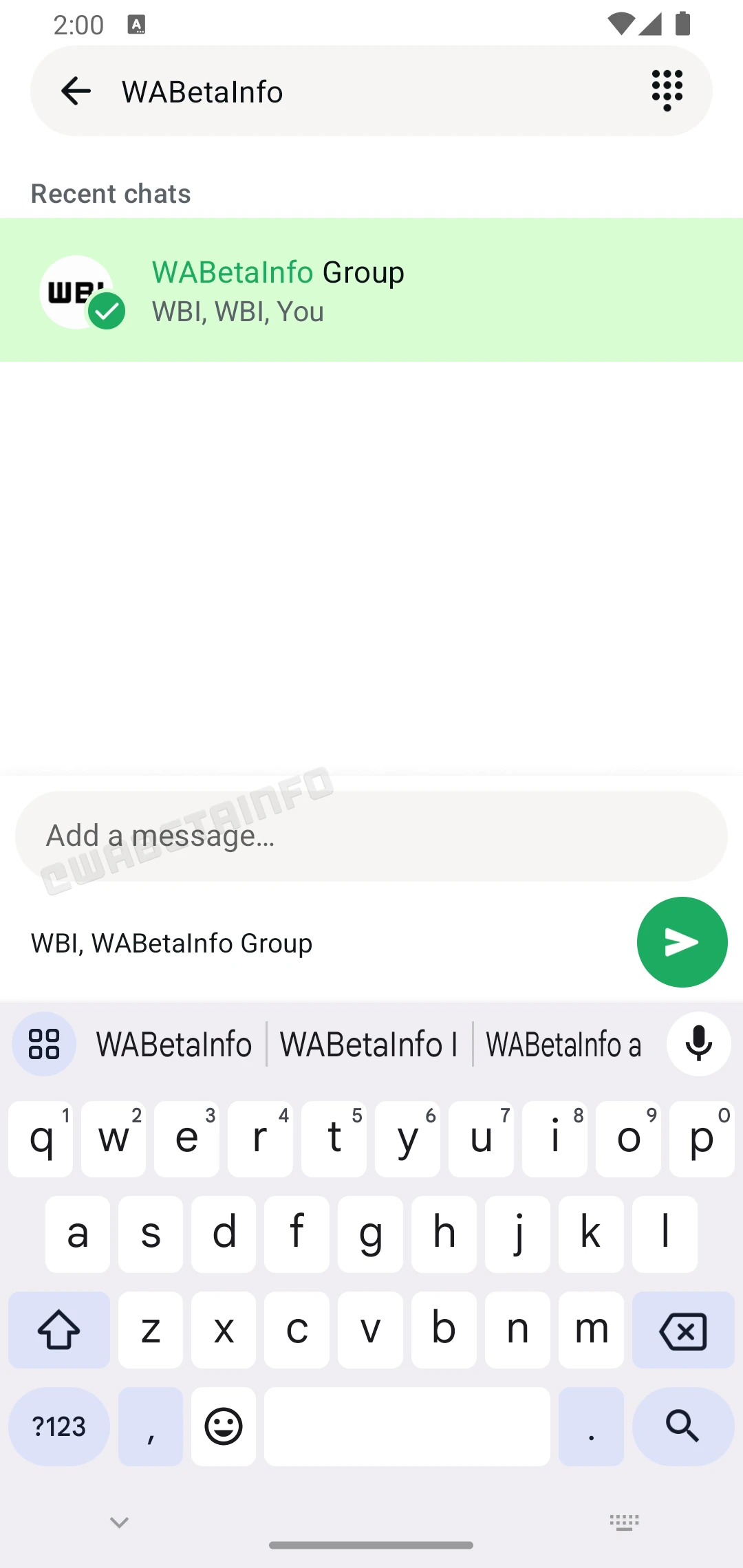
As you can see from the attached screenshot, some beta testers can explore a feature that allows them to concatenate a new message after the forwarded message. Previously, this feature was limited to media files like images, videos, and GIFs, regardless of whether they had a caption. Now, with the latest update, users can enjoy the flexibility to add a custom message to any type of forwarded content, including text messages, documents, and links. This improvement allows users to provide necessary context or explanations alongside the forwarded content without extra effort. It's important to note that this feature is not limited to forwarded messages or media files. Users can also add a new message to content that wasn't originally forwarded, including simple text messages. For example, if a user shares a text message with a contact, they can include an explanatory note or a personalized comment when forwarding it to a group chat, ensuring the message is clear and contextually relevant.
This is particularly useful in case adding more context to a forwarded message is needed. For example, if you forward a news article link, you can now immediately add your thoughts or a summary, which saves you from needing to send a separate follow-up message. Similarly, forwarding a text message can include additional details or instructions for the recipient, ensuring clarity and avoiding confusion. We believe that this feature also reduces the risk of misinterpretation since users can clarify their intent right away.
A feature to add a message to any forwarded content is available to some beta testers who install the latest updates of WhatsApp beta for Android from the Google Play Store, and it is rolling out to even more people over the coming weeks.
Stay up-to-date on WhatsApp news by following WABetaInfo on X. You can also discover other new features for WhatsApp beta for Android, iOS, Web/Desktop, and Windows.
Do you like this news? Please, let us know on X: we love hearing your feedback! If you're curious to see where you can find WABetaInfo, there is a dedicated page where you can discover our services.
In addition, we have set up a Discord Server where you can chat with other people, get help and advice, and stay up to date with the latest announcements from WABetaInfo.