WhatsApp beta for Android 2.24.24.16: what's new?
WhatsApp is rolling out a new update through the Google Play Beta Program, bringing the version up to 2.24.24.16.
What's new in this update? WhatsApp is rolling out a gallery shortcut for the chat interface, and it's available to some beta testers!
| Common questions | Answers |
|---|---|
| Name of the feature? | Gallery shortcut |
| Status? | Rolling out |
| Compatibility? | WhatsApp beta for Android 2.24.24.16 is marked as a compatible update. |
| I've installed this update but I don't have this feature. Why? | This feature is available to some beta testers, and it is rolling out to more users over the coming weeks. |
| Thanks: | Kingcyrious, Alejandro Medina, and Funf, for testing and reporting. |
| Previous news? | WhatsApp beta for Android 2.24.24.14: what's new? WhatsApp is rolling out a redesigned interface for the communities tab! |
GALLERY SHORTCUT
In the article about the WhatsApp beta for Android 2.24.23.11 update, we announced that WhatsApp was rolling out a feature to open the photo and video gallery from the chat bar. This feature replaces the previous camera shortcut with a new gallery button, enhancing access to stored photos and videos. Users can share media more conveniently without the need to open the chat attachment menu to view their gallery. It appears that WhatsApp continues to experiment with different features for the chat interface, aiming to further enhance the media sharing experience. Thanks to the latest WhatsApp beta for Android 2.24.24.16 update, which is available on the Google Play Store, we discovered that WhatsApp is rolling out a gallery shortcut for the chat interface!
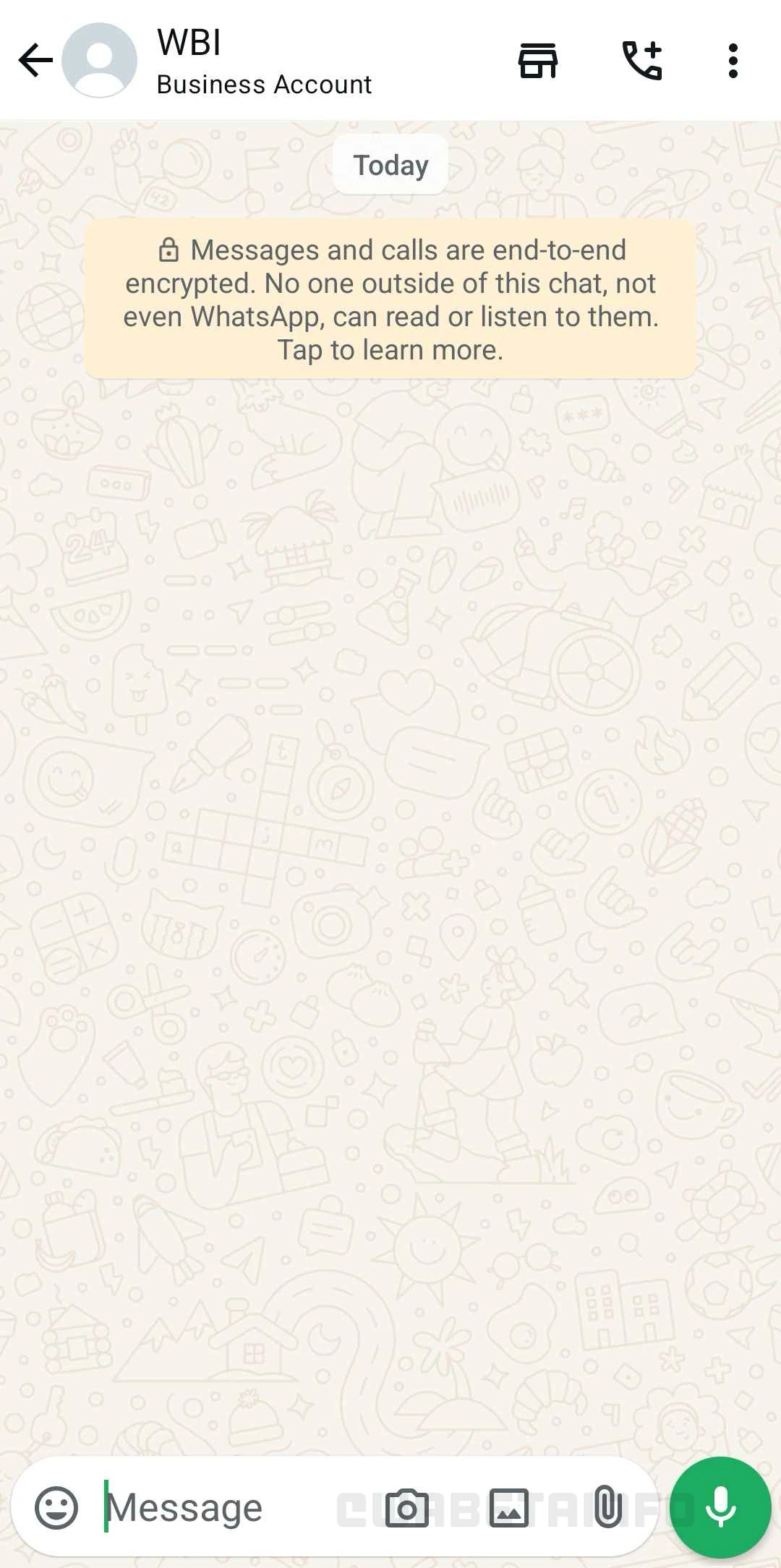
As you can see from the attached screenshot, some beta testers can explore a new shortcut to quickly open the photo gallery. This shortcut allows users to share media stored on their devices with just a tap, making the process faster and more convenient. Unlike a previous update where the camera entry point was replaced by the gallery shortcut, WhatsApp has now opted to include both shortcuts simultaneously within the chat bar. This means that users now have access to two distinct shortcuts: one for quickly capturing photos or videos using the camera and another for browsing and sharing stored media from their gallery.
The camera shortcut was valued for its ability to instantly open the camera, making it ideal for capturing and sharing moments quickly. However, when it was replaced by the gallery shortcut, some users found this change less convenient. Instead of being able to quickly capture a photo or video, they now had to take an extra step to open the attachment menu if they wanted to use the camera. For those who often rely on fast captures, this additional step disrupted their usual flow and slowed down the experience, impacting the immediacy many users enjoyed. This new approach addresses concerns from the earlier update, as it allows users to benefit from both shortcut without compromising on convenience.
As we mentioned in our earlier article, we believe this new arrangement is another experimental feature aimed at understanding how users interact with multiple shortcuts in the chat interface. The inclusion of both the gallery and camera shortcuts allows WhatsApp to gather feedback on whether this dual approach improves the user experience or creates unnecessary complexity. However, as this is still in beta, there is no guarantee that the feature will be rolled out to all users. WhatsApp may choose to refine or even remove it based on the feedback it receives, as some users may feel that it adds clutter to the chat bar.
A gallery shortcut for the chat interface is available to some beta testers who install the latest updates of WhatsApp beta for Android from the Google Play Store, and it is rolling out to even more people over the coming weeks.
Stay up-to-date on WhatsApp news by following WABetaInfo on X. You can also discover other new features for WhatsApp beta for Android, iOS, Web/Desktop, and Windows.
Do you like this news? Please, let us know on X: we love hearing your feedback! If you're curious to see where you can find WABetaInfo, there is a dedicated page where you can discover our services.
In addition, we have set up a Discord Server where you can chat with other people, get help and advice, and stay up to date with the latest announcements from WABetaInfo.