WhatsApp beta for Android 2.24.24.10: what's new?
WhatsApp is rolling out a new update through the Google Play Beta Program, bringing the version up to 2.24.24.10.
What's new in this update? WhatsApp is rolling out a feature to clarify how muting notifications from group chats works, and it's available to some beta testers!
| Common questions | Answers |
|---|---|
| Name of the feature? | Notifications for group chats |
| Status? | Rolling out |
| Compatibility? | WhatsApp beta for Android 2.24.24.10 is marked as a compatible update. |
| I've installed this update but I don't have this feature. Why? | This feature is available to some beta testers, and it is rolling out to more users over the coming weeks. |
| Thanks: | Sniper, for testing and reporting. |
| Previous news? | WhatsApp beta for Android 2.24.24.9: what's new? WhatsApp is rolling out a new gallery interface for sending photo and video albums! |
NOTIFICATIONS FOR GROUP CHATS
In the article about the WhatsApp beta for Android 2.24.21.22 update, we announced that WhatsApp was working on a clearer notification activity feature for group chats. This feature would clarify how muting group chats impacts notifications, giving users a more transparent and customizable experience for managing group notifications based on their preferences. It appears that WhatsApp is now testing this feature with the public, as some beta testers reported the new activity feature enabled for their groups. Thanks to the latest WhatsApp beta for Android 2.24.24.10 update, which is available on the Google Play Store, we discovered that WhatsApp is rolling out a feature to clarify how muting notifications from group chats works!
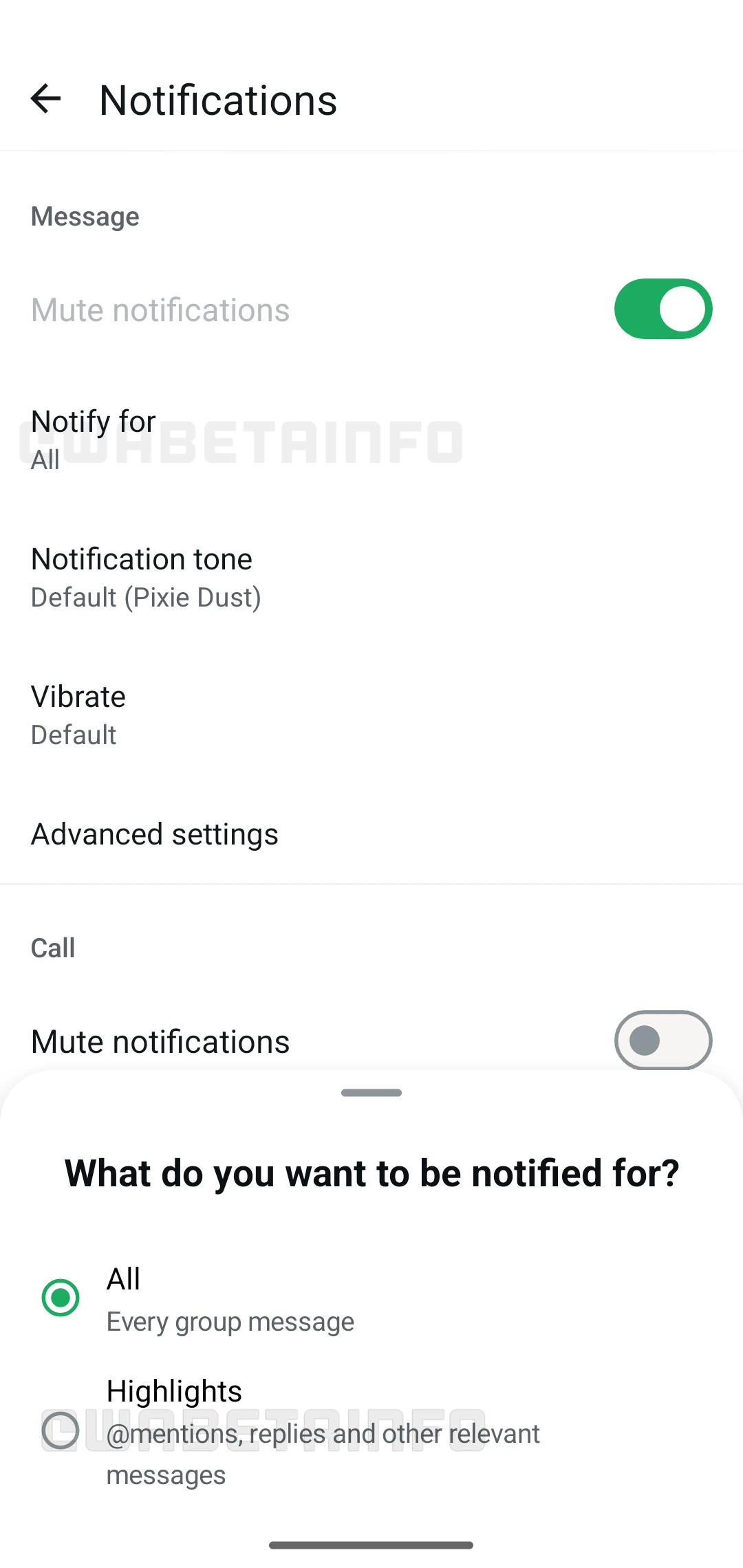
As you can see from the attached screenshot, some beta testers can explore a new notification activity feature when managing alerts for their group chats. This new feature allows users to choose between receiving notifications for all group messages or only for those marked as "Highlights", which include mentions, replies, and other direct interactions. By introducing this option, WhatsApp aims to make it easier for users to prioritize the notifications that matter most to them, especially in large group chats where message volume can become overwhelming. Instead of being notified for every message, users can limit notifications to only those interactions that specifically engage or mention them. This is particularly useful in groups with high activity, as it helps users focus on relevant updates without being overloaded with constant alerts. It is important to note that this behavior has been the default for years, but WhatsApp is now making it clearer for users by explaining exactly how muting group notifications works.
Furthermore, this feature provides clarity on how muting a group works. Currently, even when a group is muted, WhatsApp may still send notifications for certain interactions, like when a user is mentioned or directly replied to within the group. This can be confusing for users who may assume that muting a group should prevent all notifications from that group. With the new notification activity feature, WhatsApp explicitly outlines that muting a group chat can still allow notifications for mentions and replies, which can prevent confusion and enhance user control.
It's worth mentioning that the default notification setting when joining a group is determined by the group size, so larger groups will automatically default to sending notifications only for "Highlights". This allows users to avoid the disruption of receiving notifications for every message in large, active groups while still staying informed about direct interactions. Users in smaller groups, however, may continue to receive notifications for all messages by default when they join, unless they choose to modify this setting.
A feature to clarify how muting notifications from group chats works is available to some beta testers who install the latest updates of WhatsApp beta for Android from the Google Play Store, and it is rolling out to even more people over the coming weeks.
Stay up-to-date on WhatsApp news by following WABetaInfo on X. You can also discover other new features for WhatsApp beta for Android, iOS, Web/Desktop, and Windows.
Do you like this news? Please, let us know on X: we love hearing your feedback! If you're curious to see where you can find WABetaInfo, there is a dedicated page where you can discover our services.
In addition, we have set up a Discord Server where you can chat with other people, get help and advice, and stay up to date with the latest announcements from WABetaInfo.