WhatsApp beta for Android 2.24.22.19: what's new?
WhatsApp is rolling out a new update through the Google Play Beta Program, bringing the version up to 2.24.22.19.
What's new in this update? WhatsApp is rolling out a feature to get link info on Google, and it's available to some beta testers!
| Common questions | Answers |
|---|---|
| Name of the feature? | Get link info on Google |
| Status? | Rolling out |
| Compatibility? | WhatsApp beta for Android 2.24.22.19 is marked as a compatible update, but some users might experiment with the same feature by installing certain previous updates. |
| I've installed this update but I don't have this feature. Why? | This feature is available to some beta testers, and it is rolling out to more users over the coming days. |
| Thanks: | UnluckyTester, shw_9876, ShuhaibNC, Black Code, and techworldaleant, for testing and reporting. |
| Previous news? | WhatsApp beta for iOS 24.21.10.80: what's new? WhatsApp is rolling out a feature to react to messages using recent emojis! |
GET LINK INFO ON GOOGLE
In the article about the WhatsApp beta for Android 2.24.20.28 update, we announced that WhatsApp was working on a new feature to search links on the web. This feature is designed to make it easier for users to verify the authenticity of links, particularly those found in frequently forwarded messages, by allowing them to search for more information directly from Google. It appears that WhatsApp is testing this feature with the public, as some beta testers can now experiment with the ability to search links on the web. Thanks to the latest WhatsApp beta for Android 2.24.22.19 update, which is available on the Google Play Store, we discovered that WhatsApp is rolling out a feature to get link info on Google!
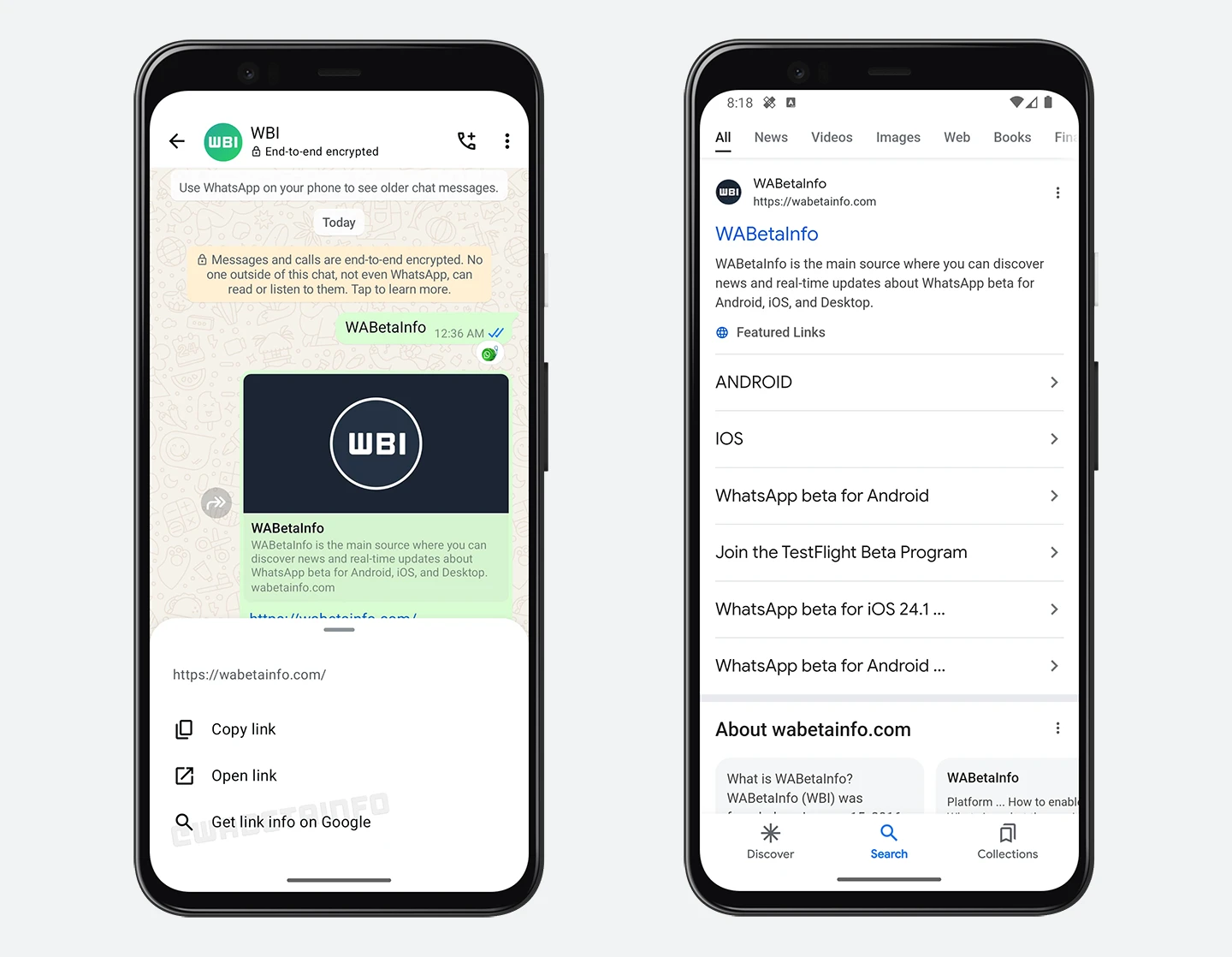
As you can see from the attached screenshot, some beta testers can explore a new feature that allows them to get info of links shared in their chats and groups. With this new feature, users do not need to open the main page of the URL directly to verify its legitimacy. Instead, they can quickly perform a Google search and check for relevant information about the link. This security measure can be particularly helpful in cases where users are unsure if the link is safe or may lead to malicious content. Some users might try to spread harmful links, and clicking on them directly could pose security risks, such as phishing attempts and malware downloads.
We believe that this move can offer users a safer way to gather information about potentially suspicious URLs before deciding whether to interact with them through the option to search for the link on Google first. It is worth noting that in our previous article, we highlighted that this feature was primarily aimed at frequently forwarded links, which are often more susceptible to containing misleading or harmful content due to their rapid spread. However, it seems that this improved link search feature now works not only with forwarded links but also with any link shared in individual or group chats, although frequently forwarded links remain a primary focus. Users simply need to tap and hold on the message link to open a bottom sheet, where they can choose the option to search for information about the link on Google.
It is very important to mention that this feature offers transparency by letting users decide whether they want to perform the search, ensuring complete control over their browsing activities. Only the specific link is shared with Google for the search, and WhatsApp cannot see or access the link the user is searching for. The search operation is entirely optional, so users are not forced to engage with the feature unless they specifically want to verify the authenticity of a link.
A feature to get link info on Google is available to some beta testers who install the latest updates of WhatsApp beta for Android from the Google Play Store, and it is rolling out to even more people over the coming days.
Stay up-to-date on WhatsApp news by following WABetaInfo on X. You can also discover other new features for WhatsApp beta for Android, iOS, Web/Desktop, and Windows.
Do you like this news? Please, let us know on X: we love hearing your feedback! If you're curious to see where you can find WABetaInfo, there is a dedicated page where you can discover our services.
In addition, we have set up a Discord Server where you can chat with other people, get help and advice, and stay up to date with the latest announcements from WABetaInfo.