WhatsApp beta for Android 2.24.22.10: what's new?
WhatsApp is rolling out a new update through the Google Play Beta Program, bringing the version up to 2.24.22.10.
What's new in this update? WhatsApp is rolling out a privacy feature to manage effects for the camera and video calls, and it's available to some beta testers!
| Common questions | Answers |
|---|---|
| Name of the feature? | Camera effects |
| Status? | Rolling out |
| Compatibility? | WhatsApp beta for Android 2.24.22.10 is marked as a compatible update, but some users might experiment with the same feature by installing certain previous updates. |
| I've installed this update but I don't have this feature. Why? | This feature is available to some beta testers, and it is rolling out to more users over the coming days. |
| Thanks: | Adwaith Varma, Kingcyrious, Traiti, Muhammad Hammad, Sniper, Saadh Jawwadh, luismcgarcia, Wawan, flakoflow, Radu Oncescu, and Alisson_13, for testing and reporting. |
| Previous news? | WhatsApp beta for iOS 24.21.10.79: what's new? WhatsApp is rolling out a call link feature within individual and group chats! |
CAMERA EFFECTS
In the article about the WhatsApp beta for Android 2.24.16.7 update, we announced that WhatsApp was rolling out an AR feature for call effects and filters. This feature allows users to personalize their video calling experience with dynamic facial filters, such as skin smoothing and low-light mode, making video calls more interactive and visually enhanced. It appears that WhatsApp aims to offer users greater control over this feature, allowing users to better manage this customizing option. Thanks to the latest WhatsApp beta for Android 2.24.22.10 update, which is available on the Google Play Store, we discovered that WhatsApp is rolling out a feature to manage effects for the camera and video calls!
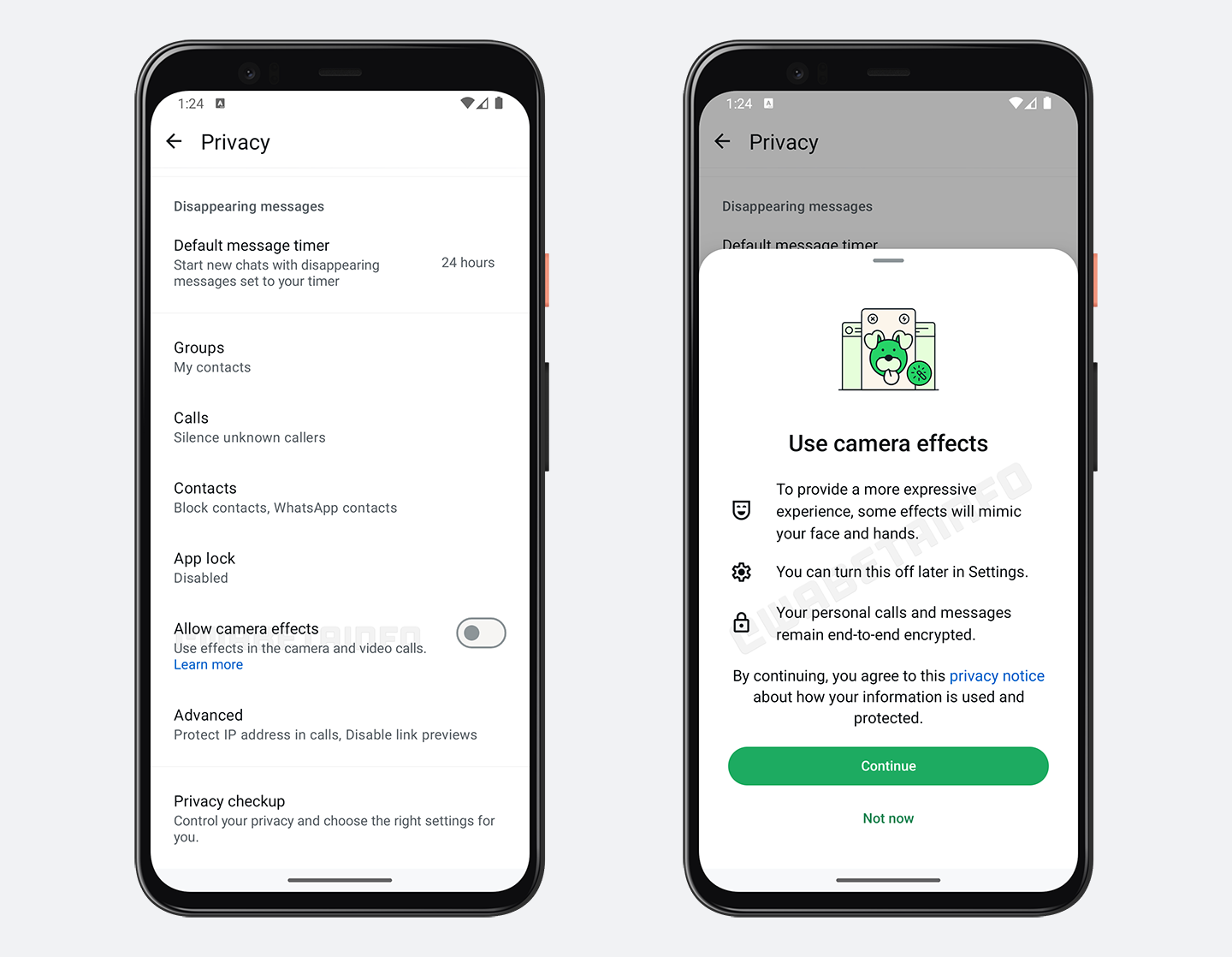
As you can see from the attached screenshot, some beta testers can explore a new privacy feature to manage effects for their camera and video calls. This new option is located within the Privacy settings, allowing people to manage their camera effects. Once enabled, it allows users to apply effects, filters, and backgrounds to both the camera and during video calls. Some effects can dynamically respond to facial expressions, hand gestures, and movements, making interactions more expressive and personalized. This feature can be toggled on or off based on the user preferences, offering flexibility in how these effects are applied. If users want to maintain a more professional or standard appearance during calls, they can simply disable these effects. Conversely, for more casual or fun interactions, the effects can easily be enabled again by toggling this option.
It is worth noting that users can already disable effects directly within the camera interface during video calls, allowing for quick adjustments on the fly. However, for those seeking a more permanent solution that hides the effects button entirely during camera use, they can opt to disable the the mentioned option in the Privacy settings. By doing so, they gain greater control over their experience, ensuring that effects are not applied automatically and that the interface remains clearer for all future video calls. It is very important to note that calls remain end-to-end encrypted, as this feature doesn't interfere with or compromise any encryption protocols.
A feature to manage effects for the camera and video calls is available to some beta testers who install the latest updates of WhatsApp beta for Android from the Google Play Store, and it is rolling out to even more people over the coming days.
Stay up-to-date on WhatsApp news by following WABetaInfo on X. You can also discover other new features for WhatsApp beta for Android, iOS, Web/Desktop, and Windows.
Do you like this news? Please, let us know on X: we love hearing your feedback! If you're curious to see where you can find WABetaInfo, there is a dedicated page where you can discover our services.
In addition, we have set up a Discord Server where you can chat with other people, get help and advice, and stay up to date with the latest announcements from WABetaInfo.