WhatsApp beta for Android 2.24.21.34: what's new?
WhatsApp is rolling out a new update through the Google Play Beta Program, bringing the version up to 2.24.21.34.
What's new in this update? WhatsApp is rolling out a feature to choose a chat theme among 20 different colors, and it's available to some beta testers!
| Common questions | Answers |
|---|---|
| Name of the feature? | Chat themes |
| Status? | Rolling out |
| Compatibility? | WhatsApp beta for Android 2.24.21.34 is marked as a compatible update, but some users might experiment with the same feature by installing certain previous updates. |
| I've installed this update but I don't have this feature. Why? | This feature is available to some beta testers, and it is rolling out to more users over the coming weeks. |
| Thanks: | elijahpxn, leo10ui, Rubiokarim, and UnluckyTester, for testing and reporting. |
| Previous news? | WhatsApp beta for Android 2.24.21.31: what's new? WhatsApp is working on a feature to search shared images on the web! |
CHAT THEMES
In the article about the WhatsApp for iOS 24.20.71 update, we announced that WhatsApp was rolling out a feature to choose a chat theme. This feature allows users to enhance their personalization experience by selecting different themes for specific conversations, rather than being restricted to a single theme across the entire app. It appears that WhatsApp now intends to offer Android users the same opportunity to change the chat theme as it already does for the iOS version. Thanks to the latest WhatsApp beta for Android 2.24.21.34 update, which is available on the Google Play Store, we discovered that WhatsApp is rolling out a feature to choose a chat theme among 20 different colors!
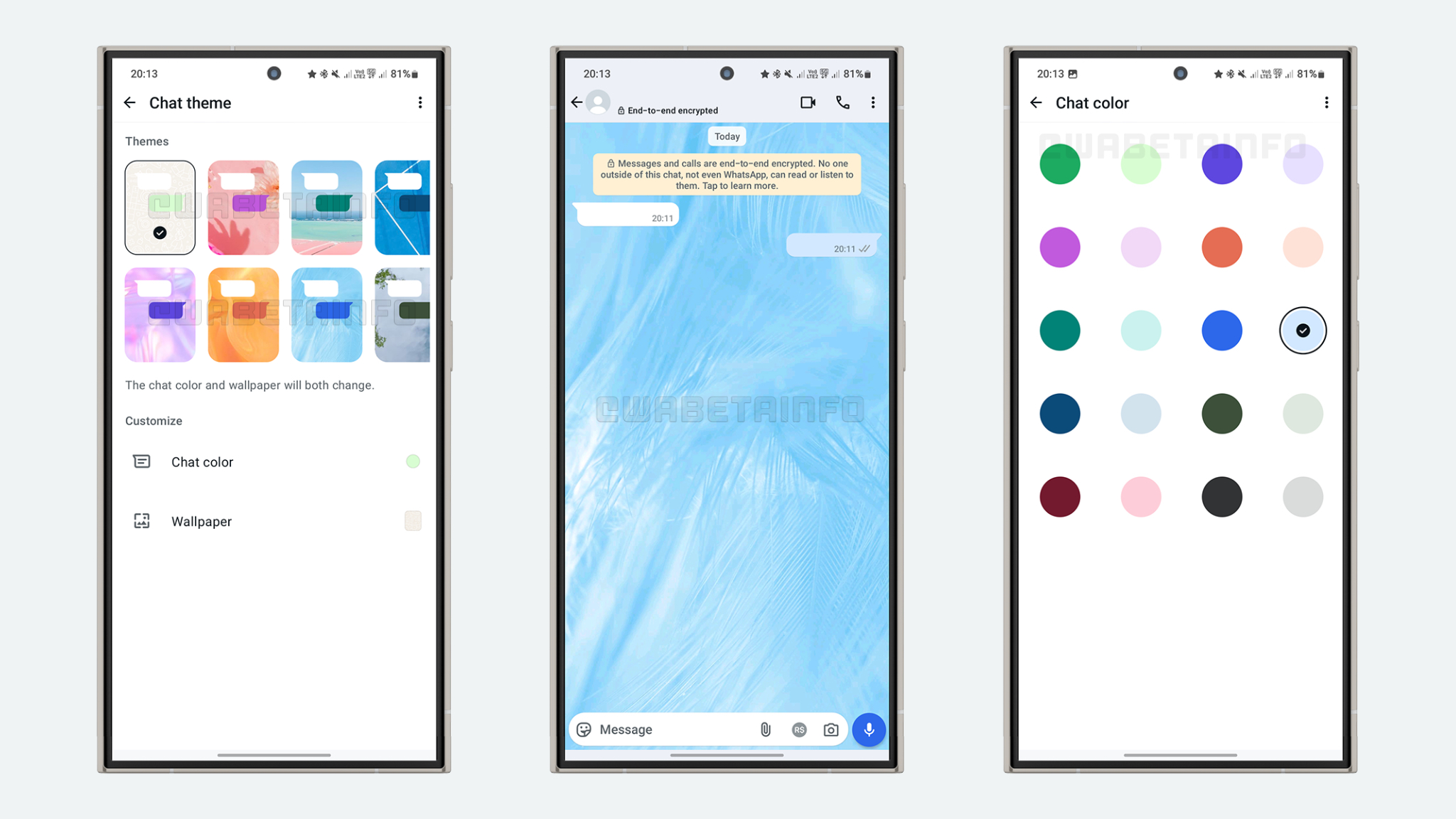
As you can see from the attached screenshot, some beta testers can explore a feature that allows them to change the chat theme. Users can select a default chat theme that will be applied to all conversations right within the app settings, ensuring a uniform and consistent look across the entire application. However, for those who prefer variety, WhatsApp also offers the ability to set a different theme for specific chats by tapping the overflow menu within a conversation. Here, users can choose the theme option to customize their chats based on their preferences. It's important to note that users can choose from a wide variety of themes, allowing them to assign different themes to various chats. For example, they can select one theme for personal chats, another for work-related conversations, and a completely different one for group chats. With over 22 distinct themes and 20 color options available, users have extensive options to customize their chats, making it easier to visually differentiate between different types of conversations based on their context.
Every time a user selects a theme, a message color will automatically be applied to complement the chosen theme. This design decision ensures that the aesthetic of the conversation remains visually cohesive, with the message color and theme working together to create a unified look. However, users also have the option to further personalize their chats by choosing a different wallpaper while keeping the selected message color. This flexibility allows users to create a distinct appearance for each conversation, even if they are using the same theme, ensuring that their chats reflect their unique preferences.
An important aspect of this feature is that theme customization is private. When a user selects a theme for a specific chat, it will only be visible on their device. The recipient of the chat will not see any changes in appearance, meaning each user can enjoy their own personalized chat experience without imposing it on others. This preserves privacy and allows for individual expression without affecting the messaging experience for other participants.
It's worth noting that this feature is currently available only to a limited number of users in order to gather feedback and ensure that it works without critical issues. By gradually rolling out the ability to choose chat themes, WhatsApp can test performance, identify any issues, and make necessary adjustments before a wider release. This phased approach allows the developers to address potential bugs and optimize the user experience based on real-world usage data from beta testers. This means that if the feature isn't available on your WhatsApp account yet, there's no issue with your account. The rollout is happening in stages, and you'll have access once WhatsApp completes testing and expands the feature to more users.
A feature to choose a chat theme among 20 different colors is available to some beta testers who install the latest updates of WhatsApp beta for Android from the Google Play Store, and it is rolling out to even more people over the coming weeks.
Stay up-to-date on WhatsApp news by following WABetaInfo on X. You can also discover other new features for WhatsApp beta for Android, iOS, Web/Desktop, and Windows.
Do you like this news? Please, let us know on X: we love hearing your feedback! If you're curious to see where you can find WABetaInfo, there is a dedicated page where you can discover our services.
In addition, we have set up a Discord Server where you can chat with other people, get help and advice, and stay up to date with the latest announcements from WABetaInfo.