WhatsApp beta for Android 2.24.18.8: what's new?
WhatsApp is rolling out a new update through the Google Play Beta Program, bringing the version up to 2.24.18.8.
What's new in this update? WhatsApp is rolling out a feature to open the privacy checkup screen from a new entry point, and it's available to some beta testers!
| Common questions | Answers |
|---|---|
| Name of the feature? | Privacy checkup |
| Status? | Rolling out |
| Compatibility? | WhatsApp beta for Android 2.24.18.8 is marked as a compatible update, but some users may be able to experiment with the same feature by installing certain previous updates. |
| I've installed this update but I don't have this feature. Why? | This feature is available to some beta testers, and it is rolling out to more users over the coming days. |
| Thanks: | Akan, Kingcyrious, and Technical MJ TV, for testing and reporting. |
| Previous news? | WhatsApp beta for iOS 24.17.10.71: what's new? WhatsApp is working on a feature to choose a chat theme! |
PRIVACY CHECKUP
In the article about the WhatsApp beta for Android 2.24.13.12 update, we announced that WhatsApp was working on a new feature to open the privacy checkup screen. With this improvement, users would have gained immediate access to the privacy checkup feature, allowing them to review and adjust their privacy settings at any time without having to wait for the banner to appear. It appears that WhatsApp is now testing this feature with the public, as some beta testers can now experiment with an immediate way to review their privacy settings. Thanks to the latest WhatsApp beta for Android 2.24.18.8 update, which is available on the Google Play Store, we discovered that WhatsApp is rolling out a feature to open the privacy checkup screen from a new entry point!
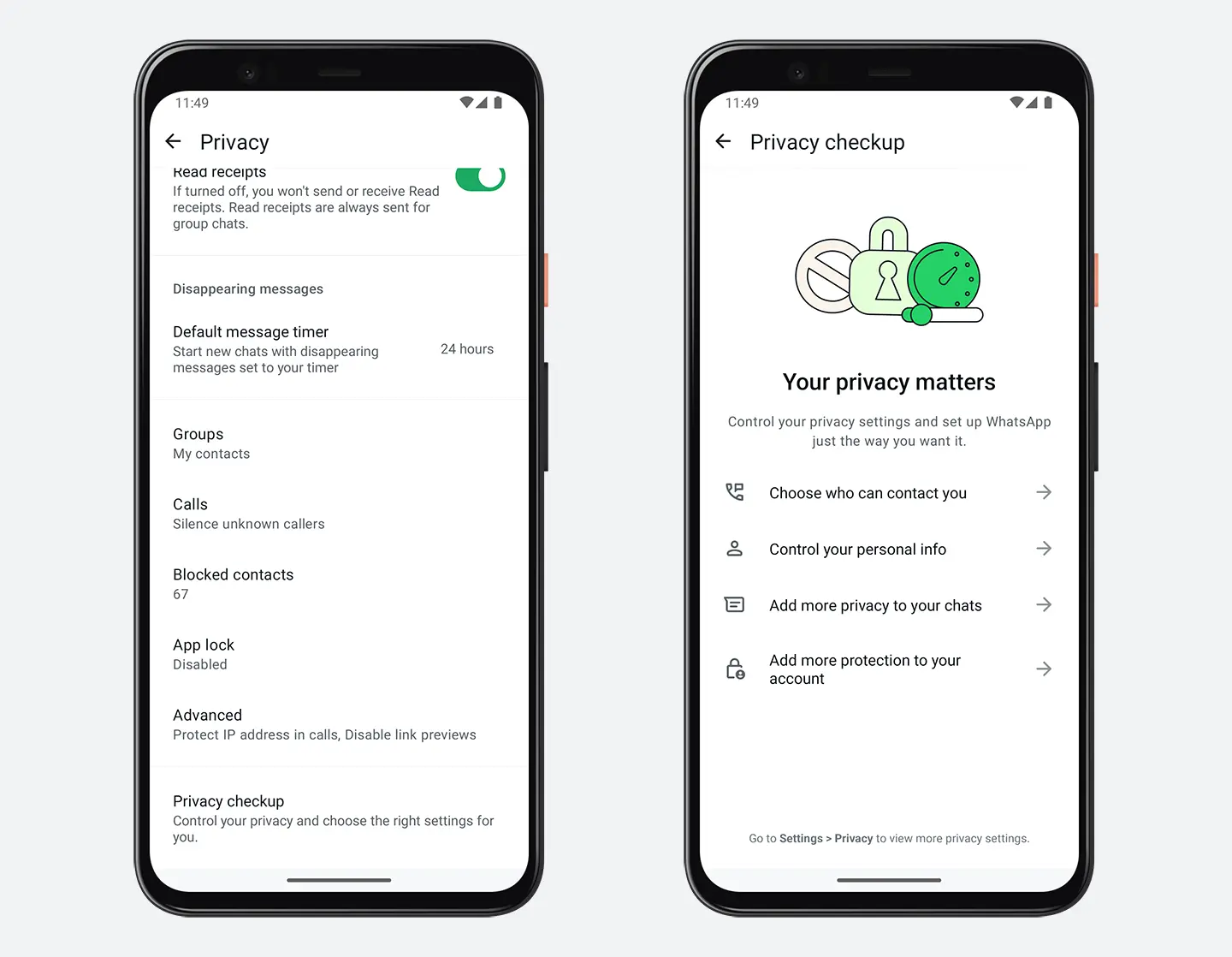
As you can see from the attached screenshot, some beta testers can access this new entry point for the privacy checkup directly from the privacy settings screen. The privacy checkup feature is designed to guide users through a series of steps to help them configure their privacy preferences according to their needs. It typically covers the most important features such as who can see your profile photo, last seen status, about information, and who can add you to groups. Users can explore the privacy checkup through the new entry point conveniently located at the bottom of the privacy screen, making it easily accessible whenever they need to review or adjust their settings.
In our opinion, WhatsApp aims to provide users with greater flexibility and control over their privacy by making this feature accessible at any time. This change is particularly useful for users who frequently update their privacy settings or those who are concerned about the visibility of their personal information. Instead of waiting for WhatsApp to prompt them with the checkup banner, users can now proactively manage their privacy settings whenever necessary. This could be especially beneficial in situations where users want to quickly adjust their settings after adding new contacts or joining new groups. We believe that the ability to access the privacy checkup screen will make it easier for users to maintain the level of privacy they desire, ensuring that their information is always protected according to their preferences.
A feature to open the privacy checkup screen from a new entry point is available to some beta testers who install the latest updates of WhatsApp beta for Android from the Google Play Store, and it is rolling out to even more people over the coming days.
Stay up-to-date on WhatsApp news by following WABetaInfo on X. You can also discover other new features for WhatsApp beta for Android, iOS, Web/Desktop, and Windows.
Do you like this news? Please, let us know on X: we love hearing your feedback! If you're curious to see where you can find WABetaInfo, there is a dedicated page where you can discover our services.
In addition, we have set up a Discord Server where you can chat with other people, get help and advice, and stay up to date with the latest announcements from WABetaInfo.