WhatsApp beta for Android 2.24.15.11: what's new?
WhatsApp is rolling out a new update through the Google Play Beta Program, bringing the version up to 2.24.15.11.
What's new in this update? WhatsApp is rolling out a new interface for status updates, and it's available to some beta testers!
| Common questions | Answers |
|---|---|
| Name of the feature? | New interface for status updates |
| Status? | Rolling out |
| Compatibility? | WhatsApp beta for Android 2.24.15.11 is marked as a compatible update, but some users may be able to experiment with the same feature by installing the previous update. |
| I've installed this update but I don't have this feature. Why? | This feature is available to some beta testers, and it is rolling out to more users over the coming weeks. |
| Thanks: | Erik Sevilla, FastenM, Traiti, and DarkCrystal, for testing and reporting. |
| Previous news? | Mark Zuckerberg announced a favorite feature to filter chats, groups, and calls on WhatsApp! |
NEW INTERFACE FOR STATUS UPDATES
In the article about the WhatsApp beta for Android 2.24.14.2 update, we announced that WhatsApp was rolling out a redesigned preview feature for status updates. This new feature allows users to see a thumbnail preview of status updates alongside the profile photo, providing them with a more informative experience. This change caters to both users who follow channels and those who do not, offering a horizontal layout for the former and a vertical list with redesigned thumbnails for the latter. It appears that WhatsApp is now committed to further refining the experience of viewing status updates, aiming to provide a more modern interface. Thanks to the latest WhatsApp beta for Android 2.24.15.11 update, which is available on the Google Play Store, we discovered that WhatsApp is rolling out a new interface for status updates!
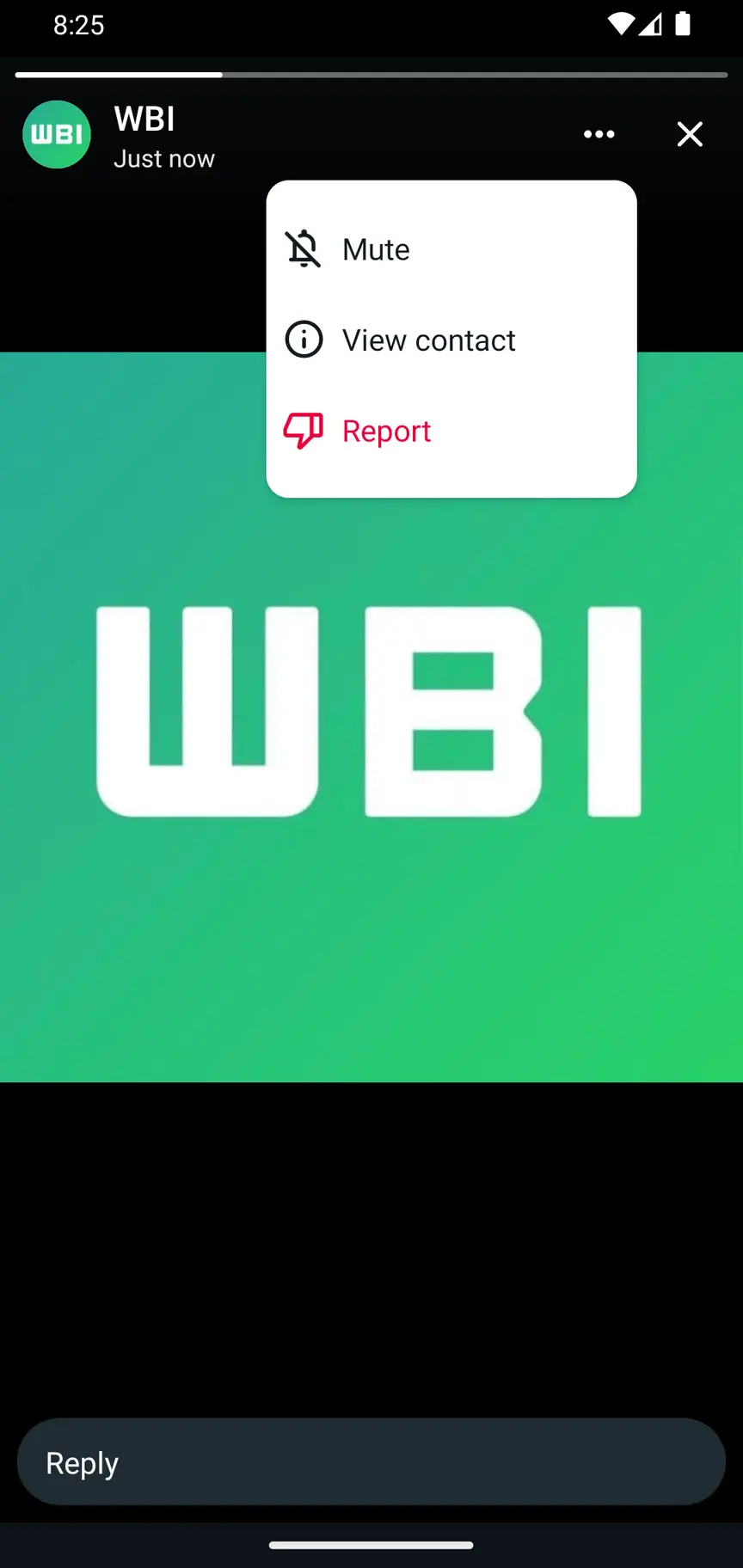
As you can see from the attached screenshot, some beta testers can now explore a new interface for the top part of the status updates screen, similar to the one available on WhatsApp for iOS. Previously, the overflow menu included numerous actions, such as calling the contact or sending a message, which could be unnecessary when viewing a status update. With the new update, WhatsApp introduced an improved interface featuring an overflow menu that now offers only essential options, including muting or reporting the status update, and viewing the contact info for additional actions. In addition, there is now a new button to close the status updates screen, along with the usual swipe-down gesture to dismiss the view.
In our opinion, the new interface may be considered more intuitive and less cluttered by certain users due to the enhancements in the new overflow menu, which now includes only the most essential options. This allows users to focus on the content of the status updates without unnecessary distractions. The addition of a dedicated button to close the status updates screen also provides users with more flexibility and control over their navigation experience, making the process of dismissing the section more convenient to use.
A new interface for status updates is available to some beta testers who install the latest updates of WhatsApp beta for Android from the Google Play Store, and it is rolling out to even more people over the coming weeks.
Stay up-to-date on WhatsApp news by following WABetaInfo on X. You can also discover other new features for WhatsApp beta for Android, iOS, Web/Desktop, and Windows.
Do you like this news? Please, let us know on X: we love hearing your feedback! If you're curious to see where you can find WABetaInfo, there is a dedicated page where you can discover our services.
In addition, we have set up a Discord Server where you can chat with other people, get help and advice, and stay up to date with the latest announcements from WABetaInfo.