WhatsApp beta for Android 2.24.10.22: what's new?
WhatsApp is rolling out a new update through the Google Play Beta Program, bringing the version up to 2.24.10.22.
What's new in this update? WhatsApp is rolling out a redesigned drawing editor, and it's available to some beta testers!
| Common questions | Answers |
|---|---|
| Name of the feature? | Redesigned drawing editor |
| Status? | Rolling out |
| Compatibility? | WhatsApp beta for Android 2.24.10.22 is marked as a compatible update, but some users may be able to experiment with the same feature by installing certain previous updates. |
| I've installed this update but I don't have this feature. Why? | This feature is available to some beta testers, and it is rolling out to more users over the coming days. |
| Thanks: | Akan, Adwaith Varma, ShuhaibNC, and FastenM, for testing and reporting. |
| Previous news? | WhatsApp beta for iOS 24.10.10.70: what’s new? WhatsApp is working on a feature to block screenshots of profile photos! |
REDESIGNED DRAWING EDITOR
In the article about the WhatsApp beta for Android 2.24.9.6 update, we announced that WhatsApp was working on a redesigned drawing editor. The revamped interface aims to elevate the user experience by enhancing interaction with the drawing tools, making it simpler and more intuitive to edit images and videos. With the WhatsApp beta for iOS 24.9.10.72 update, we announced that WhatsApp is releasing this improved drawing editor to iOS users, offering enhanced functionality and new user-friendly design to edit photos and videos. Thanks to the latest WhatsApp beta for Android 2.24.10.22 update, which is available on the Google Play Store, we discovered that WhatsApp is also rolling out the redesigned drawing editor on the Android app!
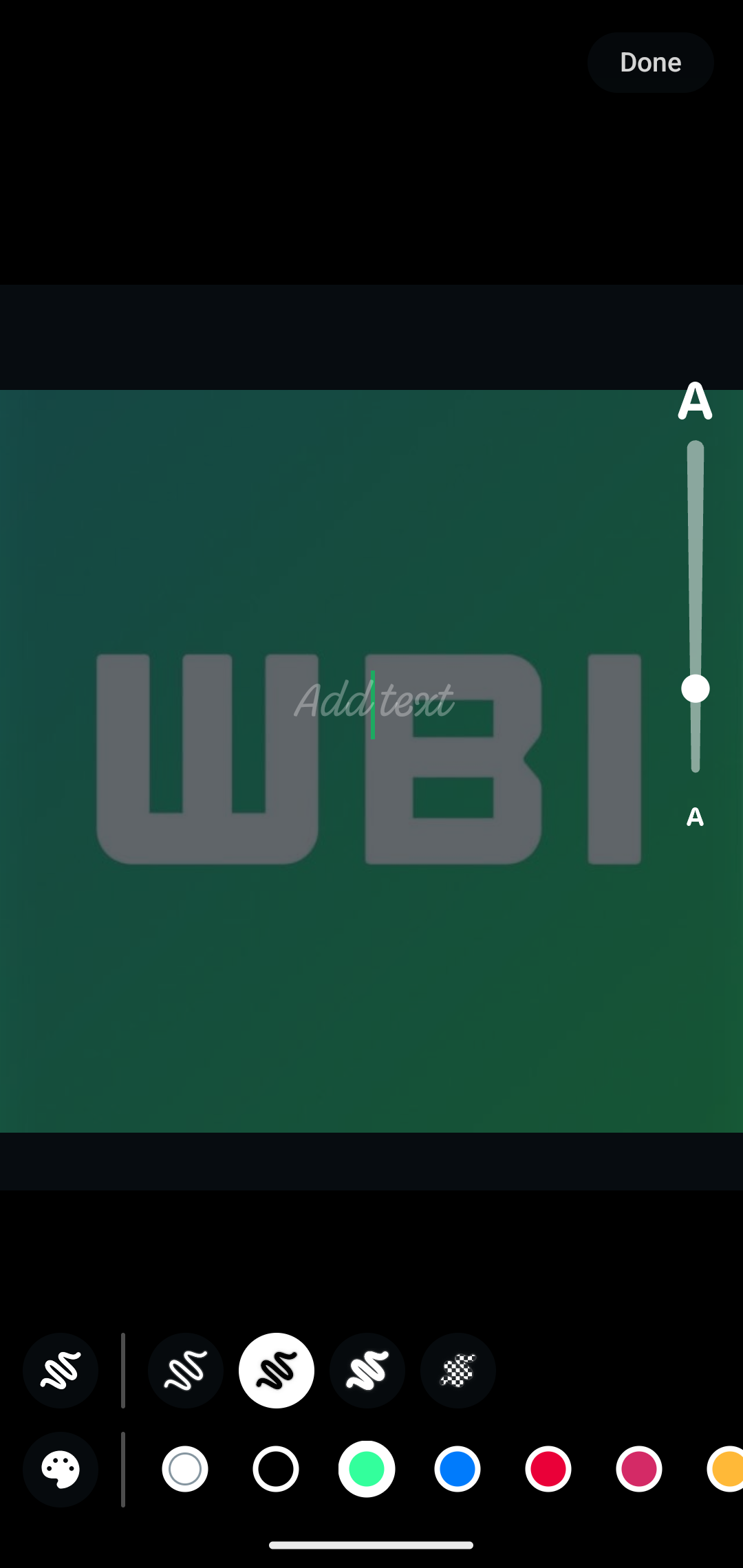
As you can see from the attached screenshot, some beta testers can now test the integration of a bottom bar for the brush and color tools within the drawing editor screen. In the past updates, the color bar was positioned at the top of the screen, which could be particularly complicated to access on larger displays. Thanks to the revamped interface for the drawing editor, WhatsApp is adding a layer of convenience to the editing experience by relocating this tool to the bottom of the screen. It is worth noting that WhatsApp just enhanced color selection by providing users with a feature to choose from a palette of 24 default colors, simplifying navigation through available color options. In addition, users can now adjust the font size by scrolling through the font size bar instead of relying on the usual gesture.
In our opinion, the revamped drawing editor brings significant advantages to the user experience. The repositioning of the color and brush toolbars to the bottom of the screen enhances convenience in editing images or videos, especially on larger devices, allowing users to interact with these features more comfortably with one hand. In addition, the expanded color palette and improved font-size adjustment offer greater creative flexibility, enabling users to customize their messages with a broader range of colors with ease.
The redesigned drawing editor is available to some beta testers who install the latest updates of WhatsApp beta for Android from the Google Play Store, and it is rolling out to even more people over the coming days.
Stay up-to-date on WhatsApp news by following WABetaInfo on X. You can also discover other new features for WhatsApp beta for Android, iOS, Web/Desktop, and Windows.
Do you like this news? Please, let us know on X: we love hearing your feedback! If you're curious to see where you can find WABetaInfo, there is a dedicated page where you can discover our services.
In addition, we have set up a Discord Server where you can chat with other people, get help and advice, and stay up to date with the latest announcements from WABetaInfo.