WhatsApp beta for Android 2.24.10.18: what's new?
WhatsApp is rolling out a new update through the Google Play Beta Program, bringing the version up to 2.24.10.18.
What's new in this update? WhatsApp is rolling out a new audio call bar feature, and it's available to some beta testers!
| Common questions | Answers |
|---|---|
| Name of the feature? | New audio call bar |
| Status? | Rolling out |
| Compatibility? | WhatsApp beta for Android 2.24.10.18 is marked as a compatible update, but some beta testers may experiment with the same feature by installing the 2.24.9.16 update or newer versions. |
| I've installed this update but I don't have this feature. Why? | This feature is available to some beta testers, and it is rolling out to more users over the coming days. |
| Thanks: | Sc, Saadh Jawwadh, and hawa hawai, for testing and reporting. |
| Previous news? | WhatsApp beta for iOS 24.9.10.75: what's new? WhatsApp is rolling out a zoom control feature for the camera! |
NEW AUDIO CALL BAR
In the article about the WhatsApp beta for Android 2.24.7.19 update, we announced that WhatsApp was rolling out a tweaked interface for the calling screen. The improved interface features a new minimize button to mitigate confusion about call navigation, and redesigned buttons at the top of the screen to make them more visible and distinguishable. It appears that WhatsApp is now committed to further enhancing call navigation while the user leaves the calling interface, making it easier to manage it. Thanks to the latest WhatsApp beta for Android 2.24.10.18 update, which is available on the Google Play Store, we discovered that WhatsApp is rolling out a new audio call bar feature!
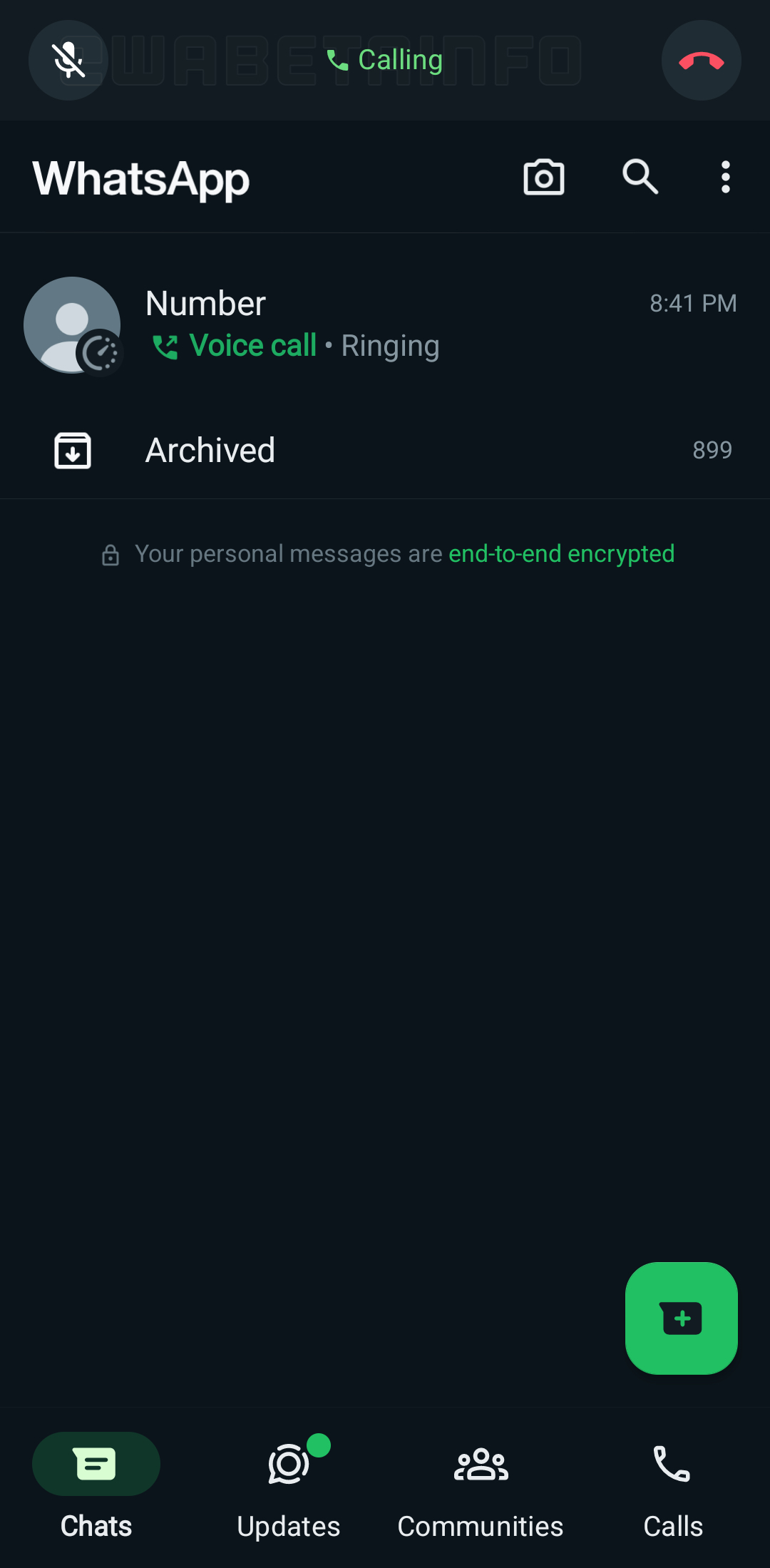
As you can see from the attached screenshot, some beta testers are currently experimenting with a new feature to manage outgoing audio calls within the app. When minimizing the call, a revamped call bar appears at the top of the interface, providing users with greater control over the outgoing call. Previously, users could return to the call by tapping the green status bar. With the new call bar, users can now both mute and end the call directly, eliminating the need to navigate back to the call screen.
In our opinion, the introduction of the new call bar offers significant advantages for users, as it enhances multitasking capabilities by allowing users to manage outgoing calls with ease. This means users can continue with other tasks or conversations within the app while still having quick access to some call controls while experimenting with a more modern interface for the call bar. In fact, the new call bar also simplifies call management by providing direct access to essential features like muting and ending the call, since users no longer need to navigate back to the call screen to perform these actions.
A new audio call bar feature is available to some beta testers who install the latest updates of WhatsApp beta for Android from the Google Play Store, and it is rolling out to even more people over the coming days.
Stay up-to-date on WhatsApp news by following WABetaInfo on X. You can also discover other new features for WhatsApp beta for Android, iOS, Web/Desktop, and Windows.
Do you like this news? Please, let us know on X: we love hearing your feedback! If you're curious to see where you can find WABetaInfo, there is a dedicated page where you can discover our services.
In addition, we have set up a Discord Server where you can chat with other people, get help and advice, and stay up to date with the latest announcements from WABetaInfo.