WhatsApp is rolling out new features that make messaging more flexible and convenient than ever. Users can now manage multiple accounts, transfer chats across devices, and enhance conversations with advanced tools like sticker suggestions and Meta AI photo editing.
| Key Points | Details |
|---|---|
| Name of the feature: | Multiple accounts and cross-platform transfer |
| Status: | Rolling out |
| Compatibility: | The latest versions of WhatsApp for Android and iOS are designated as compatible updates. |
| Previous news: | WhatsApp is working on custom audiences for status updates on Android beta! |
WhatsApp is rolling out Multiple Accounts, Cross-Platform Transfer, and new chat tools
In the post about the WhatsApp beta for iOS 25.34.10.72 update, we announced a feature that allows users to manage and use multiple accounts on the same device. This functionality enables users to add and switch between different accounts directly within the app without logging out. Accounts have their own chat history, notifications, and settings, making it simpler for users to keep their conversations organized. With multiple accounts in the same app, users no longer need to download WhatsApp Business for managing another account. Since it is possible to add and switch between different accounts directly within the main app, users can handle all their conversations without relying on WhatsApp Business.
When we initially announced the feature, it was available to a limited number of users. This controlled rollout allowed WhatsApp to gradually test its stability and performance. The test also allowed WhatsApp to identify and fix any potential bugs before a wider release. Today, WhatsApp has officially announced the introduction of multiple accounts in a post on the WhatsApp Blog, along with other tools that add a new layer of convenience to the user experience.
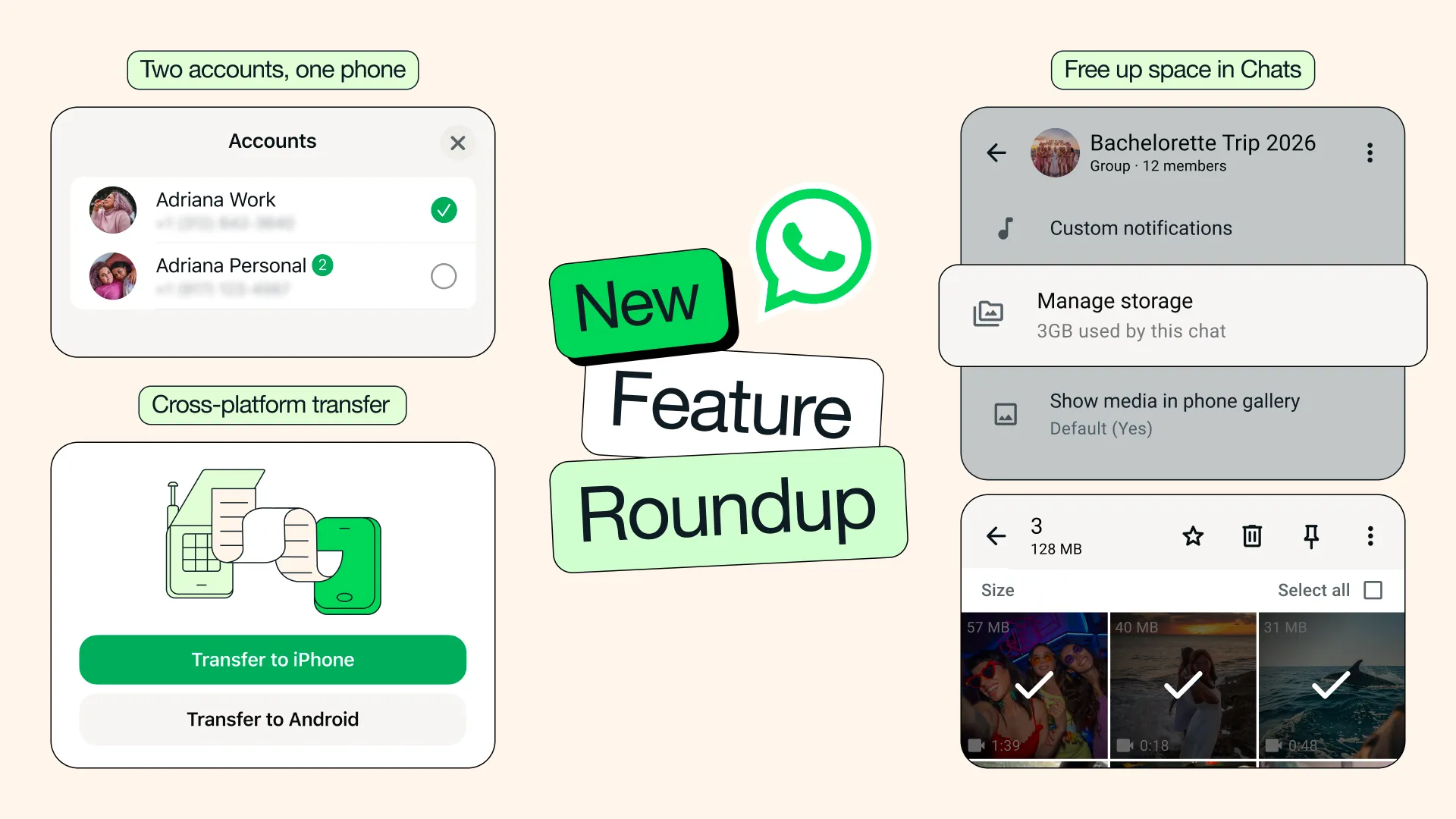
WhatsApp revealed multiple accounts, a new feature now available to a large number of users on WhatsApp for iOS. With multiple accounts, iOS users can finally have two separate WhatsApp accounts logged in at the same time. Users can easily distinguish which account they are using by checking the profile icon placed in the tab bar. Note that this is the same feature WhatsApp released on the Android app years ago, and it brings the iOS experience in line with what Android users have been able to explore for quite some time. Just tap and hold the You tab to see if you can already add a second account.
WhatsApp also announced a new cross-platform transfer. This improved version enables users to securely move their chat history to another device. A cable is no longer needed to transfer your chat history from iOS and Android, but you just need a stable Wi-Fi connection. The process is designed to be quick and straightforward, making it easier for users to transfer messages, media, and other data without losing any important information.
WhatsApp is widely rolling out a new tool to quickly manage storage from the chat info screen. This feature allows users to view how much space a specific conversation is taking up and access the storage overview directly without opening the general settings. It is possible to see all shared photos, videos, and documents in a grid and sort them by newest, oldest, or largest. Users can also select and delete multiple files at once to free up space faster. Additionally, users can now clear chat storage more precisely, as they can choose to clear just media files when clearing a chat.
Sticker suggestions is another feature announced in the blog post. Now, WhatsApp presents suggestions for new stickers as users type an emoji in their chats. With this feature, WhatsApp displays a limited number of third-party stickers from a sticker provider. Users can also select the best sticker from a collection of over 100 options by opening the search results.
In those regions where Meta AI is available, users can now edit and enhance their photos using Meta AI. Instead of opening the conversation with Meta AI, it's possible to edit photos directly in your chats before sending them. Users can improve their photos with new styles, and each style applies a distinct aesthetic. The editor also lets users modify the actual content of an image. For example, it is possible to add new elements, improve details, or adjust specific areas to enrich the scene. Users can also animate the image to bring it to life with motion effects.
Last year, WhatsApp announced Writing Help, a feature designed to assist users in composing clearer messages. It suggests grammar improvements, tone adjustments, and phrasing options, making your messages more polished and easier to understand. Messages generated by Writing Help are secured by Private Processing, a technology designed to process messages in a secure cloud environment so that neither WhatsApp nor Meta can access the original content or the AI‑generated suggestions. Today, WhatsApp is highlighting this feature again, suggesting that it is now available to a wider group of users.
These new features are widely rolling out today, and they will be available to everyone over the coming weeks. Users can expect to see them appear automatically without updating the app. However, it is still recommended to keep the app updated to the latest version to ensure everything works correctly.
Stay Connected with WABetaInfo
Following WABetaInfo on X is the best way to stay informed about new features under development and those released to WhatsApp beta for Android, iOS, Web, and Desktop. We love hearing your feedback, so let us know what you think! You can also explore our dedicated page to discover all our services, or join our Discord Server to chat with others, get help and advice, and stay up to date with the latest WABetaInfo announcements.