Following the recent announcement about filters and backgrounds for WhatsApp video calls, Mark Zuckerberg just revealed custom lists to better organize and filter chats and groups from the chats list.
| Common questions | Answers |
|---|---|
| Name of the feature? | Filter chats through custom lists |
| Status? | Rolling out |
| Compatibility? | Latest versions of WhatsApp for iOS and Android from the App Store and the Google Play Store are compatible updates. |
| I've installed this update but I don't have this feature. Why? | This feature is available to some users, and it's rolling out to more people over the coming weeks. |
| Previous news? | WhatsApp beta for iOS 24.22.10.76: what's new? WhatsApp is rolling out a new phone call dialer feature on iPad! |
FILTER CHATS - CUSTOM LISTS
In the article about the WhatsApp beta for Android 2.24.22.5 update, we announced that WhatsApp was rolling out a feature to filter chats through custom lists. This update marks a significant step towards improved chat organization, offering users an enhanced way to access their most relevant conversations quickly and efficiently. Users can filter their chats by creating personalized lists that display only selected contacts and group chats, allowing them to navigate their messages with ease. It appears that WhatsApp is finally testing this feature with a wider audience, as Mark Zuckerberg just officially announced custom lists from his official WhatsApp channel.
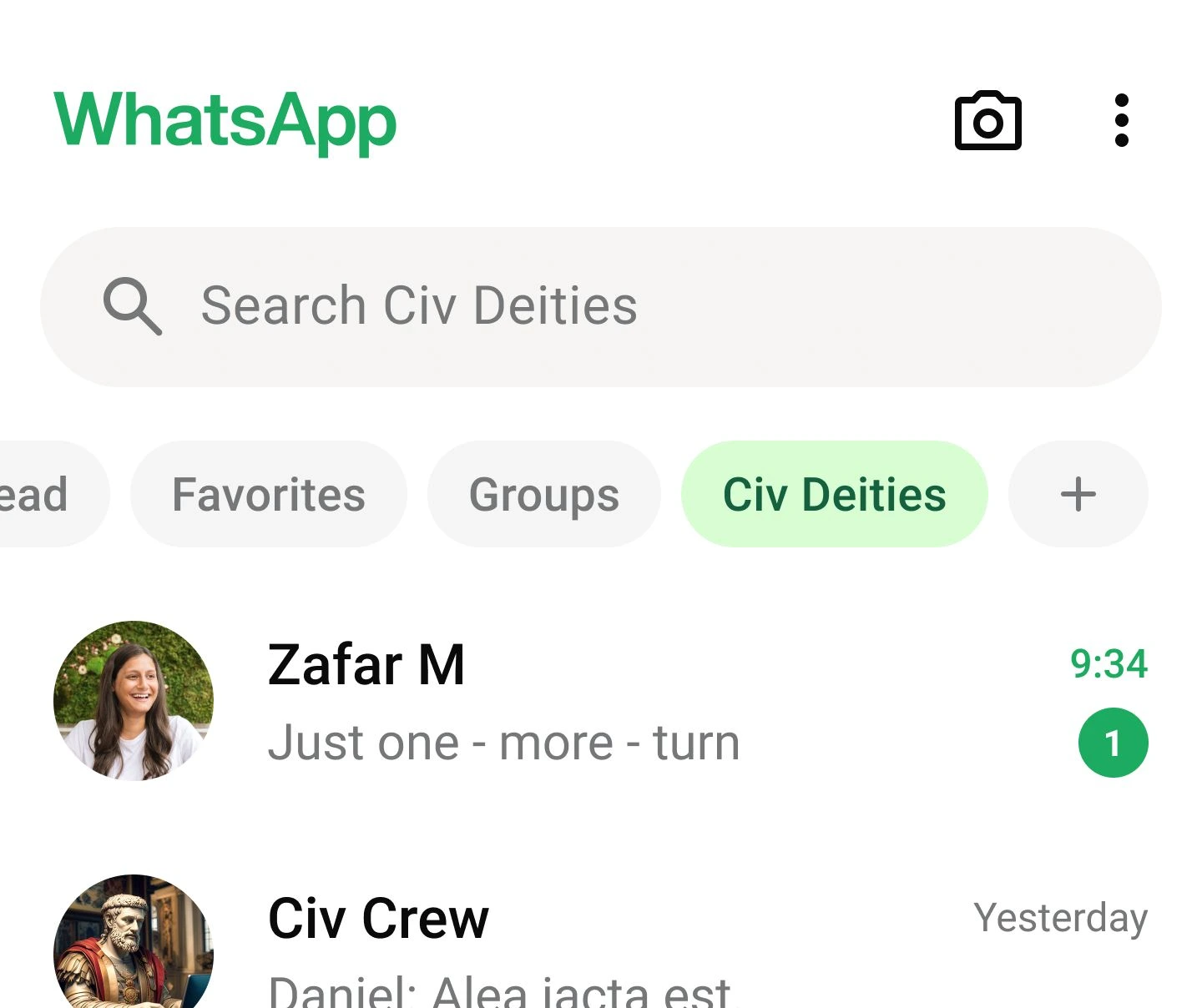
Mark Zuckerberg and WhatsApp announced that custom lists are designed to help users organize their conversations better by allowing them to sort contacts and group chats into focused categories. To create a list, users can simply tap on a new button located within the chats list, which will prompt them to select contacts and groups they wish to include. Once the list is created, WhatsApp automatically generates a filter for that list and displays it prominently at the top of the chats list. This makes it easier for users to access specific lists, like "Family", "Work", or "Close Friends" with just a tap, rather than scrolling through all recent chats. Users can create up to 20 custom lists, which is a limit intended to keep the interface cleaned and prevent it from becoming cluttered with too many filters.
Once created, lists are fully customizable, allowing users to edit their contents whenever needed. By accessing a dedicated menu at the bottom of the chats list, users can view all their custom lists, add or remove contacts and groups, and even rename lists to better suit their organization needs. Additionally, if users want to change the order of how their lists appear, they can manage this directly in app settings, arranging them in a way that prioritizes their most frequently used lists at the top of the chat tab.
The introduction of custom lists and filters is also expected to be particularly beneficial for businesses using WhatsApp, as it allows them to categorize chats with clients, suppliers, or team members, enhancing the efficiency of managing various business-related conversations. For example, businesses can create lists specifically for customer inquiries, order tracking, or ongoing projects, allowing them to quickly locate important messages. It is very important to note that all lists are private. This means that only the user who creates and manages a list can see it, ensuring that personal organization choices and categorized chats remain confidential.
A feature to filter chats through custom lists is available to some users who install the latest updates of WhatsApp for Android from the Google Play Store and WhatsApp for iOS from the App Store, and it is rolling out to even more people over the coming weeks.
Stay up-to-date on WhatsApp news by following WABetaInfo on X. You can also discover other new features for WhatsApp beta for Android, iOS, Web/Desktop, and Windows.
Do you like this news? Please, let us know on X: we love hearing your feedback! If you're curious to see where you can find WABetaInfo, there is a dedicated page where you can discover our services.
In addition, we have set up a Discord Server where you can chat with other people, get help and advice, and stay up to date with the latest announcements from WABetaInfo.