Sharing a concept is a great way to provide feedback and suggestions for new future features on WhatsApp beta for Android, iOS, and Desktop. After discussing the concept of bringing a feature to hide messages from blocked contacts in group chats, we are excited to share another concept to improve the user experience: a feature to retrieve WhatsApp chat history shared with other users!
| Common questions | Answers |
|---|---|
| Name of the concept? | Share chat history |
| Availability? | Unfortunately, this feature is not currently available as it is only our concept at this time. |
| I've installed the most recent update but I don't have this feature. Why? | Unfortunately, this feature is currently only a concept and is not yet available as a real feature on WhatsApp. However, we hope that it may be implemented in the future based on feedback and further development. |
| Previous news? | WhatsApp 2024 Highlights: The Most Important Features and Updates for iOS and Android! |
SHARE CHAT HISTORY
One of the most frustrating issues for WhatsApp users is losing their chat history, whether it's from switching to a new phone without backing up, accidentally deleting a chat, or losing important messages. It often feels like there's no way to recover those conversations. However, through our feature concept, we've come up with a solution that would allow users to request a copy of their chat history directly from their contacts. This feature would solve a common problem many users face: the loss of important chats. If users lose messages due to a phone change, a corrupted or overwritten backup, or accidental deletion, this feature could help them easily recover their conversations by requesting a copy from the other person in the chat.
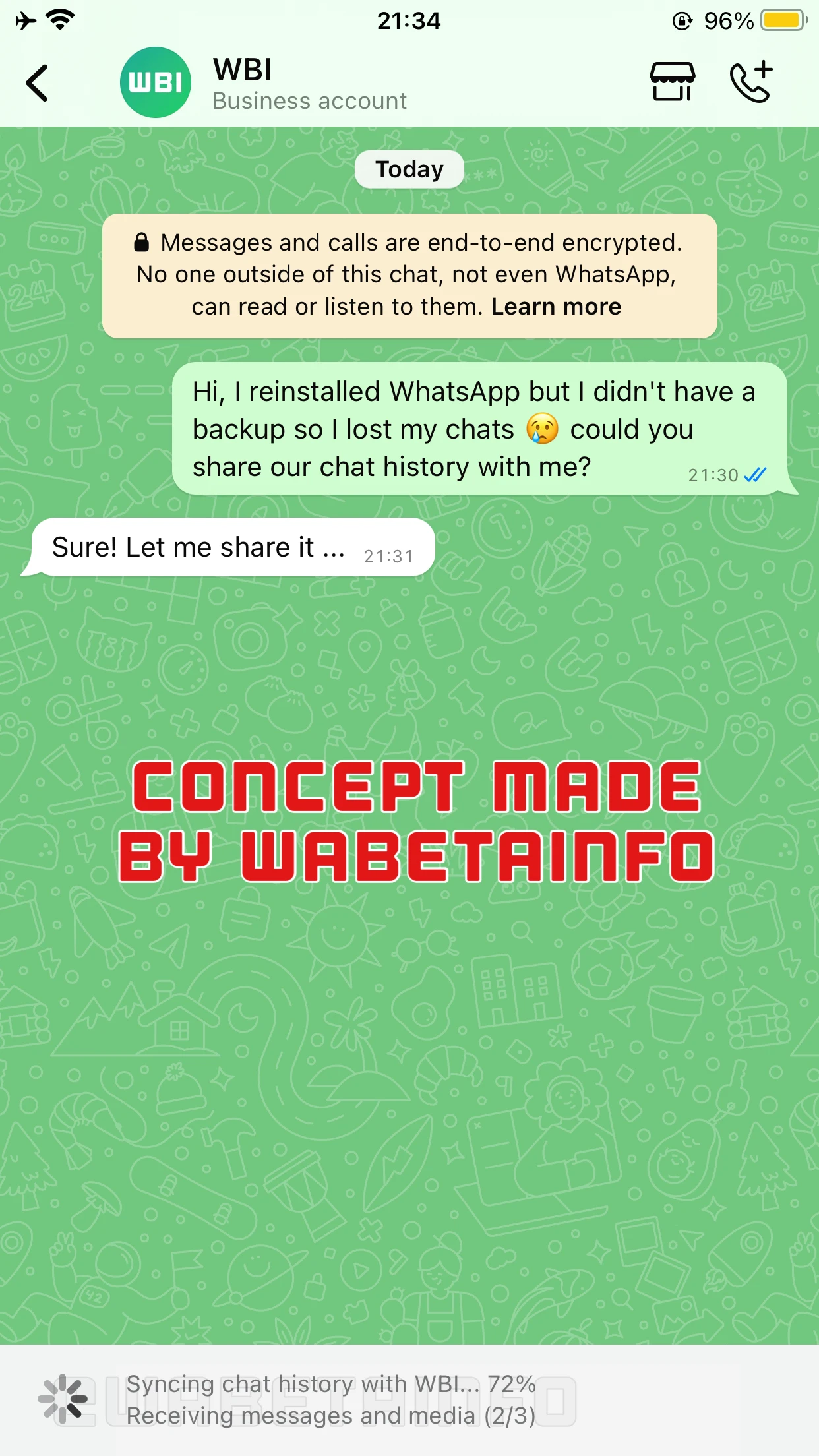
Our concept introduces a new feature that would enable users to restore their chat history by asking specific contacts to send them a copy of the conversations they've had together. This concept is based on a feature announced in the article about the WhatsApp beta for Android 2.23.18.5 update, where new group members would be able to see the previous chat history in the future. After requesting the chat history, both the sender and the recipient will need to authenticate themselves with a 6-digit code to confirm their identities. This step ensures that both parties are legitimate owners of their respective accounts, protecting the privacy and security of the shared chat history.
A minimum battery percentage and a stable Wi-Fi network must also be available on both devices to prevent interruptions and ensure a smooth transfer. After both users meet these requirements, the synchronization process begins. The device of the recipient (the person who has accepted the request) will send all the messages shared between the two parties to the requester's device. It's worth noting that these messages will be inverted during the process. This means that the messages will appear on the requester's device as if they were sent by them, with the recipient's messages appearing as if they were sent by the other party. This creates a seamless experience where the entire conversation history is restored on the requester's device. All media, including photos, videos, and voice messages, will be transferred along with the text messages, ensuring a complete restore.
To make sure the process runs smoothly, the chat will be temporarily paused during the transfer to avoid interference. This means that users won't be able to send new messages specifically in this conversation, which could disrupt the process. If the transfer is expected to take a significant amount of time, the system might create a temporary group to ensure communication between the two users isn't interrupted. For obvious reasons, the ability to add additional members to this temporary group will not be available. Additionally, it won't be possible to delete or export the chat synced with the recipient during the process. Once the transfer is complete, the temporary group will be automatically closed, and the messages will be integrated into their respective conversations.
It's very important to highlight that the entire synchronization process can be secured with WhatsApp's end-to-end encryption. This ensures that only the two users involved in the conversation can access and view the messages, neither WhatsApp nor Meta will have access to the chat content. In addition, as with the process of syncing chat history to a new linked device, even metadata (such as timestamps and some sender/receiver details) will be encrypted, ensuring complete privacy throughout the synchronization.
Please note that the feature described in this concept is not currently available on WhatsApp. While this is simply our personal concept at this time, we hope that it will be considered for implementation in a future update of the app. We believe this feature would be a significant advancement in providing users with a tool to restore chats by requesting a copy from their contacts, making it a valuable addition to the user experience. If we receive any updates or information about the possibility of this feature being implemented, we will make sure to share it through additional articles on our website. We hope that you enjoyed learning about our concept and we will appreciate your feedback.
Stay up-to-date on WhatsApp news by following WABetaInfo on X where you can also discover other new features for WhatsApp beta for Android, iOS, Web/Desktop, and Windows.
Do you like this news? Please, let us know on X: we love hearing your feedback! If you're curious to see where you can find WABetaInfo, there is a dedicated page where you can discover our services.
In addition, we have set up a Discord Server where you can chat with other people, get help and advice, and stay up to date with the latest announcements from WABetaInfo.