Concepts are a great way to share feedback and suggestions for potential new features on WhatsApp. After exploring expanded notification options, we're now introducing a new concept focused on organizing the bottom navigation bar on WhatsApp.
WhatsApp concept explores customizable tabs for the main app interface
WhatsApp currently organizes the main interface using a fixed set of tabs placed at the bottom of the screen. On WhatsApp for Android, users can quickly navigate between Chats, Updates, Communities, and Calls, each designed to group specific types of interactions. The Chats tab is where the app shows conversations with contacts and groups. The Updates tab allows users to share content via Status and Channels. The Communities tab helps users manage community announcements and related groups. Finally, the Calls tab provides quick access to voice and video call history.
However, WhatsApp is also exploring new ways to expand the interface. For example, we announced that WhatsApp is already working on introducing a dedicated tab for Meta AI soon. This tab would make it easier for users to access AI-powered features directly from the main screen. As more features are gradually added and tabs are replaced, the interface may become confusing for some users.
Because of this, some users might prefer more flexibility when organizing the main interface. While WhatsApp is also developing new customization options through the upcoming WhatsApp Plus experience, another possible improvement could focus specifically on giving users greater control over which tabs appear in the bottom navigation bar. For this reason, we created a concept that imagines a new section where users can organize the tabs displayed in the main interface.
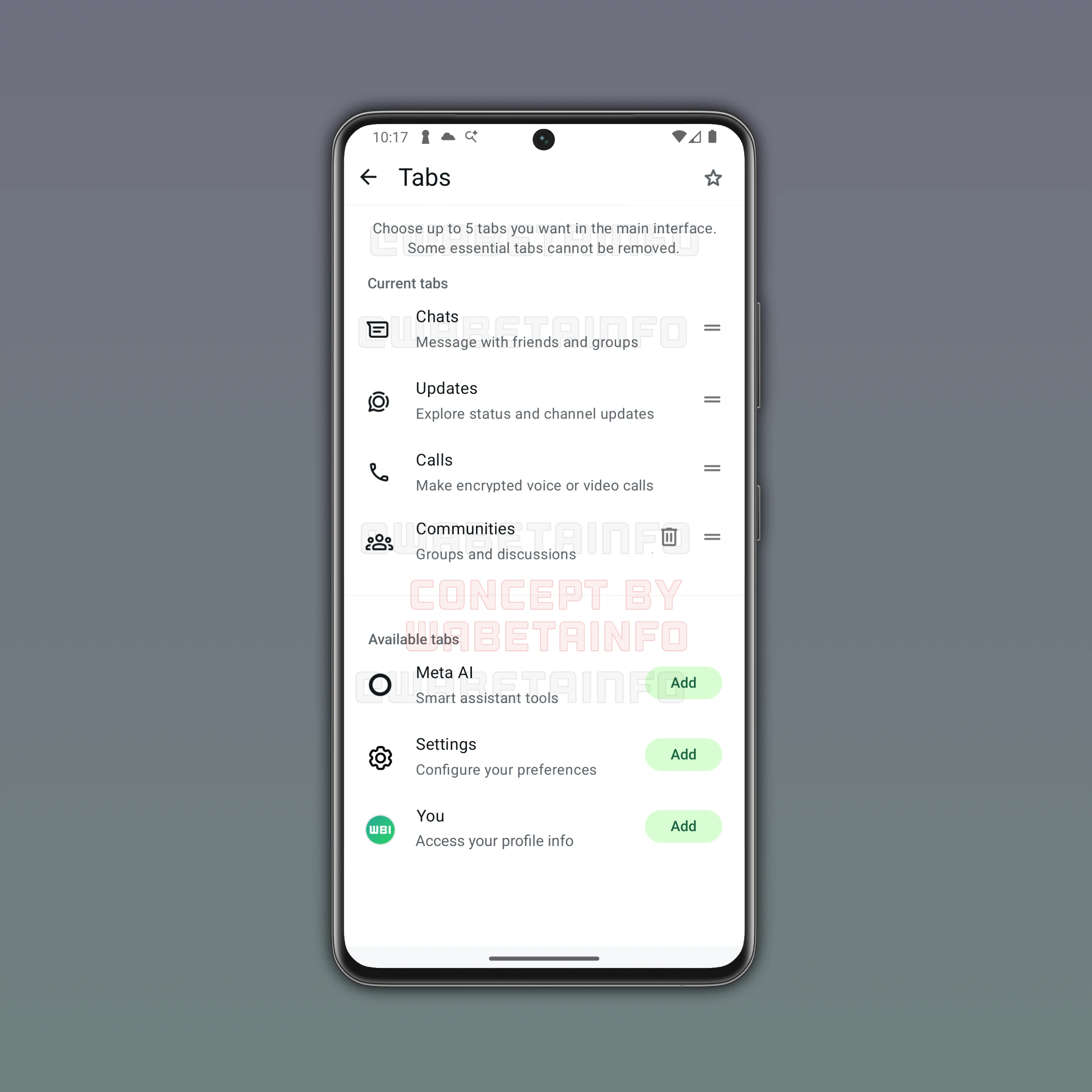
This concept introduces a dedicated screen where users can choose which tabs should appear in the navigation bar. However, users would be able to select up to five tabs to display in total. In our concept, the configuration page includes a short description to explain that some essential tabs cannot be removed. Specifically, the Chats, Updates, and Calls tabs are always present because they represent the core features of the application. These essential tabs appear under a section called Current tabs, alongside two additional slots that users can customize.
Below this section, we can find other available tabs that users can choose to add to the interface. Users can simply select one of these options to include it among their active tabs. This feature would allow users to tailor the navigation bar according to their preferences. Among the available options in the concept is the Communities tab, which provides direct access to community hubs and the groups associated with them. Since the Communities tab will be replaced with a centralized hub dedicated to Meta AI, and community groups are also listed into the Chats tab, some users may prefer to remove it in order to keep the interface cleaner.
Another available option is the Meta AI tab. Some users may want to add this tab to the interface for added convenience. However, this tab not designed to be essential. As a result, users would be able to remove this tab from the main interface once it is released. The concept also includes a Settings tab, which would give users a faster way to access app preferences directly from the main interface. Finally, users could choose to add a real Profile tab. This tab would offer direct access to personal profile details such as name, photo, and about without opening the app settings. Note that a similar concept may also be applied to WhatsApp for iOS.
This concept aims to show how WhatsApp could offer a more flexible interface while still keeping the most important sections of the app always accessible. However, it is worth noting that the feature described in this concept is not currently available on WhatsApp. While this is purely our concept at the moment, we hope it may be considered for a future update of the app. We believe that adding the ability to organize the main app interface would be a significant improvement, as it would allow users to adapt the navigation bar to their personal preferences and prioritize the sections they access the most. If we receive any updates or news regarding the possible implementation of this feature in the future, we will be sure to share it in a new article on this website. We hope you enjoyed learning about our concept, and we welcome your feedback.
Stay Connected with WABetaInfo
Following WABetaInfo on X is the best way to stay informed about new features under development and those released to WhatsApp beta for Android, iOS, Web, and Desktop. We love hearing your feedback, so let us know what you think! You can also explore our dedicated page to discover all our services, or join our Discord Server to chat with others, get help and advice, and stay up to date with the latest WABetaInfo announcements.